
Best Way to Track Business Reports and GST for Small Businesses in India
Kenfra Research - Bavithra2026-04-13T17:20:20+05:30Running a small business in India teaches you many things—sales, customer handling, and most importantly, managing accounts. But one area where many of us struggle is tracking business reports and handling GST properly. I’ve personally gone through that confusion—missing entries, incorrect totals, and last-minute GST panic. Over time, I realized that success in business is not just about earning money, but also about GST tracking it the right way. This blog shares a clear, simple, and practical approach to managing business reports and GST, along with my real experience using Kenfra BillPad.
Why Business Report Tracking is Important
Every small business owner should understand this:
If you don’t track your numbers, you don’t understand your business.
Proper business report tracking helps you:
- Monitor daily sales reports
- Understand profit and loss
- Track business expenses
- Prepare for GST return filing India
- Make better financial decisions
Without proper reports, your business runs on guesswork—not data.
Switching to a Digital Billing System
The biggest improvement in my business came when I switched from manual work to a digital billing app. Using Kenfra BillPad, I started managing everything in one place—billing, reports, and GST tracking. At first, I thought it would be complicated. But it turned out to be simple and very useful.
My Real Experience with Kenfra BillPad
I’ll keep it honest—this is not just theory. This is what I experienced.
1. Fast and Easy Billing
Creating invoices became quick and professional using this GST billing software India.
2. Automatic GST Calculation
No more manual math. The app calculates GST instantly, reducing errors.
3. Real-Time Business Reports
I can now check:
- Daily sales reports
- Monthly revenue
- Profit margins
This is very helpful for small business accounting.
4. Expense Tracking Made Simple
Tracking business expenses is easier with a proper expense management tool.
5. Stress-Free GST Filing
Since all data is already recorded, GST return filing becomes smooth and quick.
Best Way to Track Business Reports (Step-by-Step Guide)
Here’s a simple system using modern business management software and GST billing software in India that actually works in real life. This method helps you stay organized, reduce errors, and make better decisions.
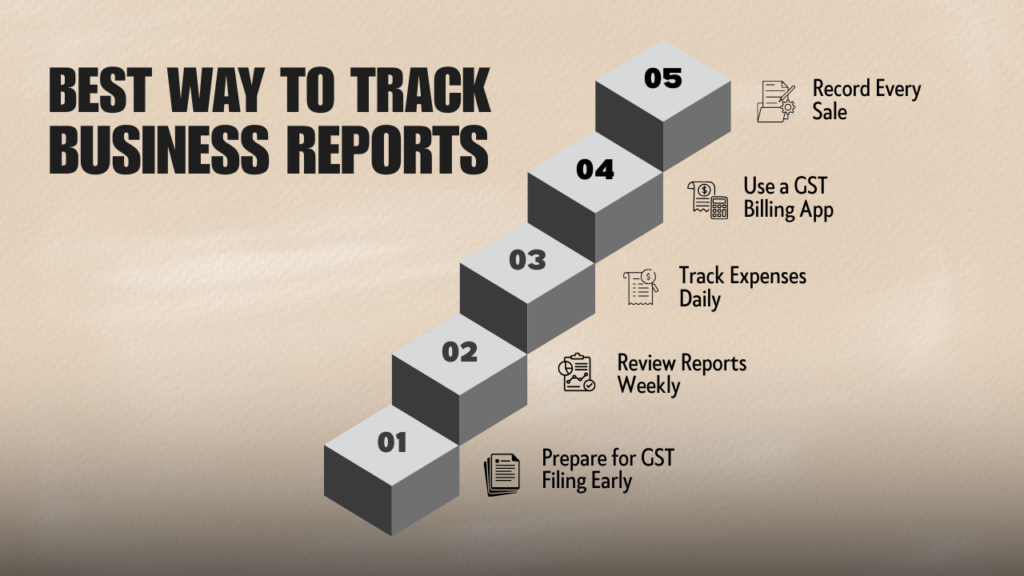
Step 1: Record Every Sale
Use a digital invoice software instead of notebooks.
Every sale—big or small—should be recorded immediately. When you delay entries, chances of missing transactions increase. A good billing software for small business ensures all your data is stored safely and accurately.
Pro Tip: Add customer details and payment method (cash, UPI, card). This helps in better sales tracking and reporting later.
Step 2: Use a GST Billing App
Apps like Kenfra BillPad help with automatic GST calculation and billing.
Instead of manually calculating CGST, SGST, or IGST, the app does everything for you. This reduces errors and saves time during GST return filing in India.
Pro Tip: Always select the correct GST rate for each product or service to avoid compliance issues.
Step 3: Track Expenses Daily
Use a proper expense tracker for small business.
Many business owners focus only on sales but ignore expenses. This is a big mistake. Without tracking expenses, you won’t know your real profit.
Record:
- Rent
- Electricity bills
- Staff salary
- Purchase costs
- Transport expenses
Pro Tip: Categorize expenses properly. This helps in creating clear expense reports and improves financial management.
Step 4: Review Reports Weekly
Check your:
- Sales reports
- Expense reports
- Profit reports
Weekly review helps you understand how your business is performing. You can identify slow-moving products, high expenses, or profit leaks.
Pro Tip: Look for trends. For example, which days have more sales or which products perform best. This improves your business decision-making.
Step 5: Prepare for GST Filing Early
Don’t wait until the deadline. Keep your GST data updated daily.
When your invoices and expenses are already recorded in a GST tracking app, filing returns becomes easy and stress-free.
Pro Tip: Set a fixed day every week to review your GST summary. This avoids last-minute confusion.
GST Tracking Made Easy
Many people search for: “How to track GST for small business in India?”
Here’s the simple answer:
- Maintain proper invoices
- Track input and output GST
- Use a GST tracking app
- Keep records updated regularly
Using a tool like Kenfra BillPad acts as a complete GST management software, making your work easier.
How I Improved My Business with Digital Billing
When I started my business, I used manual billing and basic calculations. I thought that was enough.
But as my sales increased, problems started:
- Bills were hard to manage
- Reports didn’t match
- GST filing became stressful
One day, I searched for the best billing software for small business India and found Kenfra BillPad.
After using it:
- My billing became faster
- Reports became clear
- GST calculations became accurate
Today, I don’t worry about accounts. I focus more on growing my business.
That one decision—switching to a digital billing solution—changed everything.
Benefits of Using Kenfra BillPad
Here’s why it works well for small businesses:
- Easy to use (even for beginners)
- Saves time with automation
- Improves accuracy in reports
- Helps in GST compliance
- Acts as an all-in-one billing and accounting software
Expert Tips for Small Business Owners
From real experience, here are some practical tips:
- Always record transactions immediately
- Don’t depend on memory or manual notes
- Use simple accounting software India
- Keep business and personal finances separate
- Review your reports regularly
Frequently Asked Questions
1. How can I track GST easily for my small business?
You can track GST easily by using a GST billing app that automatically calculates tax on every invoice. It helps you manage input GST, output GST, and GST return filing without manual calculations.
2. Is manual billing good for GST tracking?
Manual billing is not recommended for growing businesses. It increases the chances of errors, missed entries, and incorrect GST calculations. A digital invoice software in India is a better option for accuracy and efficiency.
3. Which is the best GST billing software for small businesses in India?
The best GST billing software is one that is simple, affordable, and easy to use. Kenfra BillPad is a good option because it combines billing, reporting, and GST tracking in one platform.
4. How often should I review my business reports?
You should review your business reports weekly and do a detailed analysis monthly. Regular tracking helps you understand your sales performance, expenses, and profit trends.

Final Thoughts
Managing business reports and GST in India doesn’t have to be complicated. The key is using the right method and tools. From my experience, switching to a GST billing app like Kenfra BillPad made my work easier, faster, and stress-free. If you’re still using manual systems, now is the time to upgrade. A simple digital accounting solution can save hours of work and help you grow your business confidently.








Leave a Reply