
Common GST Invoice Mistakes and How to Fix Them
Kenfra Research - Bavithra2026-02-12T17:17:21+05:30Goods and Services Tax (GST) has made tax filing more transparent and organized in India. But many businesses still make GST invoice mistakes while creating a gst invoice. These small errors can lead to penalties, rejected returns, and loss of input tax credit.
If you are a business owner, freelancer, or accountant, understanding the gst invoice meaning and process is very important. In this blog, we will explain what is gst invoice, common mistakes people make, and quick fixes to avoid problems.
Let’s get started.
What is a GST Invoice?
A gst invoice is a legal document issued by a seller to a buyer for goods or services supplied. It contains details like:
- Seller name and GSTIN
- Buyer details
- Invoice number and date
- Description of goods/services
- Taxable value
- CGST, SGST, or IGST amount
- Total amount payable
The gst invoice meaning is simple — it is proof of a transaction and proof of tax charged. Without a proper gst invoice bill, buyers cannot claim Input Tax Credit (ITC).
Businesses usually create invoices using a gst invoice generator, accounting software, or through tools available on the gst portal.
5 Common GST Invoice Mistakes and How to Fix Them Easily
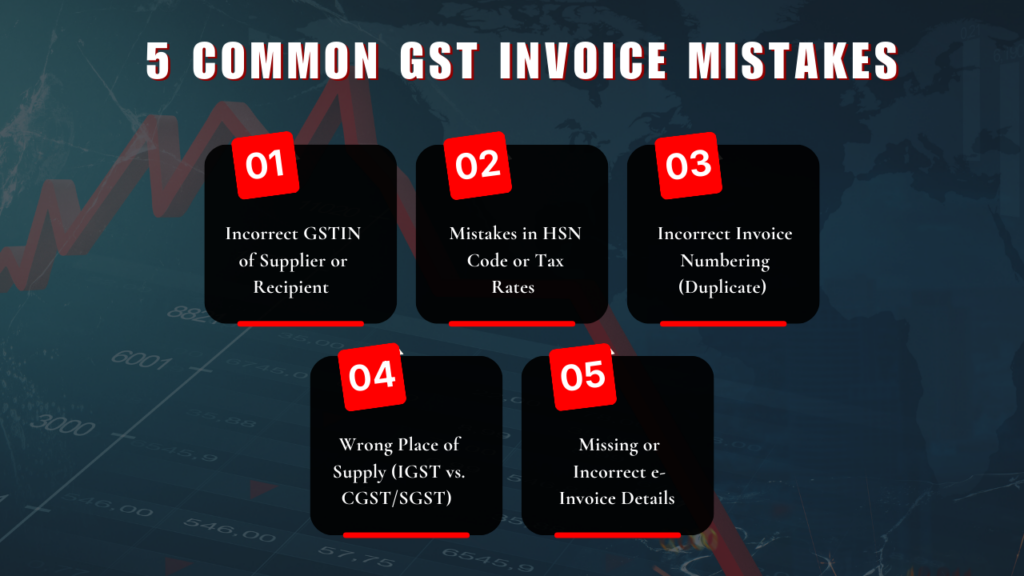
1. Incorrect GSTIN of Supplier or Recipient
The Problem
Every GST-registered business has a 15-digit GSTIN number. While creating an invoice, many people type the wrong GSTIN. Sometimes they mix up numbers like “0” and letter “O”. Sometimes they enter a GSTIN that is cancelled or inactive.
If the GSTIN is incorrect:
- The buyer may not get Input Tax Credit.
- The invoice will not match GST records.
- You will get a notice from GST department.
The Simple Solution
Before creating GST invoice, always check the GSTIN on official GST website using the “Search Taxpayer” option.
If you use billing software, turn on GSTIN auto-check or auto-fill features. This reduces typing mistakes.
Taking one minute to verify GSTIN can save you from future trouble.
2. Mistakes in HSN Code or Tax Rates
The Problem
Every product and service has an HSN code and a fixed GST rate like 5%, 12%, 18%, or 28%. Many businesses use the wrong HSN code or apply the wrong tax rate.
For example:
- Charging 18% instead of 5%
- Using an old tax rate
- Selecting the wrong product category
This usually happens when businesses do not update their tax data regularly.
The Simple Solution
Keep an updated list of HSN codes and GST rates in your billing software.
Check GST rate changes regularly from official CBIC notifications. If you are not sure about the tax rate, confirm before issuing the invoice.
Using updated data helps you avoid overcharging or undercharging tax.
3. Incorrect Invoice Numbering (Duplicate or Non-Sequential)
The Problem
GST rules say that invoice numbers must be:
- Unique
- In proper sequence
- Not repeated
- Maximum 16 characters
Some businesses accidentally:
- Use the same invoice number twice
- Skip numbers in between
- Add special symbols not allowed under GST
This can create confusion during audits and GST return filing.
The Simple Solution
Use accounting software that automatically generates invoice numbers in order.
Do not manually edit invoice numbers unless necessary.
Make sure:
- Numbers follow a proper sequence
- They are not longer than 16 characters
- Only “-” or “/” symbols are used if needed
Automatic numbering makes compliance easy.
4. Wrong Place of Supply (IGST vs. CGST/SGST)
The Problem
GST has different tax types:
- CGST and SGST for sales within same state
- IGST for sales between different states
Many businesses apply the wrong tax type.
For example:
- Charging CGST and SGST for inter-state sales
- Charging IGST for intra-state sales
This usually happens when the place of supply is not checked properly.
The Simple Solution
Look at the first two digits of the customer’s GSTIN. These digits show the state code.
If the seller and buyer are in the same state → Charge CGST + SGST.
If they are in different states → Charge IGST.
In special cases like “Bill-to Ship-to” transactions, check carefully before selecting the tax type.
Correct tax selection prevents return mismatches.
5. Missing or Incorrect e-Invoice Details (IRN/QR Code)
The Problem
Business with the turnover above ₹5 crore will must generate the e-invoices for the B2B transactions.
Some businesses:
- Forget to generate Invoice Reference Number (IRN)
- Do not include QR code
- Enter incorrect details like wrong PIN code
- Create normal invoice instead of e-invoice
If IRN is not generated, the invoice is considered invalid under GST rules.
The Simple Solution
If your business crosses the required turnover limit:
- Generate invoices through the official e-invoice system
- Use API-based integration with the e-invoice portal
- Ensure IRN and QR code are generated properly
Using automated integration reduces mistakes and saves time.
Why Avoiding These Invoice Mistakes Is Important?
Mistakes in GST invoices can cause:
- Rejection of Input Tax Credit
- GST notices
- Penalties and interest
- Return mismatches
- Extra work during audit
Even small typing errors can create big problems later.
By checking details carefully and using proper accounting software, you can avoid most of these issues.
Frequently Asked Questions (FAQs)
1. Which error is most common during GST filing?
The most common mistake during GST filing is entering the wrong GSTIN number. Even one wrong digit can cause problems. Because of this, the buyer may not get Input Tax Credit (ITC).
Other common mistakes include wrong tax calculation, incorrect invoice numbers, and mismatch between sales data and GST returns. Always check details carefully before filing GST returns.
2. What are common e-invoicing mistakes?
Some common e-invoicing mistakes are:
- Not generating the IRN (Invoice Reference Number)
- Missing QR code on the invoice
- Entering wrong GSTIN
- Adding incorrect PIN code
- Using duplicate invoice numbers
- Selecting the wrong place of supply
If your business must follow e-invoicing rules, always generate invoices through the official portal or use billing software to avoid these mistakes.
3. What are common problems found during an invoice review?
When checking invoices, businesses usually find:
- Wrong GSTIN details
- Incorrect HSN code
- Wrong GST rate
- Duplicate invoice number
- Missing required information
- Wrong tax type (IGST instead of CGST/SGST or the opposite)
Checking invoices before sending them to customers can prevent these problems.
4. What are the errors in invoice processing?
Invoice processing errors happen mostly due to manual work. Some common errors are:
- Wrong tax calculation
- Data mismatch with GST returns
- Skipped or repeated invoice numbers
- Missing e-invoice details like IRN
- Using old tax rates
Using billing software instead of manual entry helps reduce these mistakes.
5. How does Kenfra Billpad help with GST invoicing?
Kenfra Billpad is a online billing software that makes GST billing simple. It helps you create correct invoices, calculate GST automatically, and keep invoice numbers in order.
It reduces manual mistakes and helps businesses follow GST rules properly. This makes GST filing easier and safer.

Final Thoughts
Creating a GST invoice is not just about billing the customer. It is also about following tax rules correctly and keeping your business compliant.
Most GST invoice mistakes happen because of:
- Carelessness
- Outdated information
- Manual data entry
- Lack of verification
The good news is that all these problems can be avoided with simple steps.
Using reliable tools like Kenfra Billpad can make your invoicing process much easier. It is a free billing software designed to reduce manual errors, generate invoices quickly, and help you follow GST rules properly.






Leave a Reply