

From Distraction to Dissertation: Forest App, TickTick, and Research Rabbit Explained
Kenfra Research - Bavithra2026-01-09T17:24:58+05:30Writing a dissertation is not a one-day task—it is a long academic marathon that demands focus, consistency, planning, and self-discipline. In today’s digital world, students face a unique paradox: the same devices meant to help with research often become the biggest sources of distraction. Social media notifications, messaging apps, endless emails, and poorly organized tasks can easily derail months of academic effort. This is where dissertation productivity tools step in—not as distractions, but as digital allies.
In this detailed guide, we explain how three powerful dissertation productivity tools—Forest App, TickTick, and Research Rabbit—can help you move from distraction to dissertation completion, along with practical, step-by-step instructions on how to use each tool effectively.
Forest App: Mastering Focus and Eliminating Distractions
What Is Forest App?
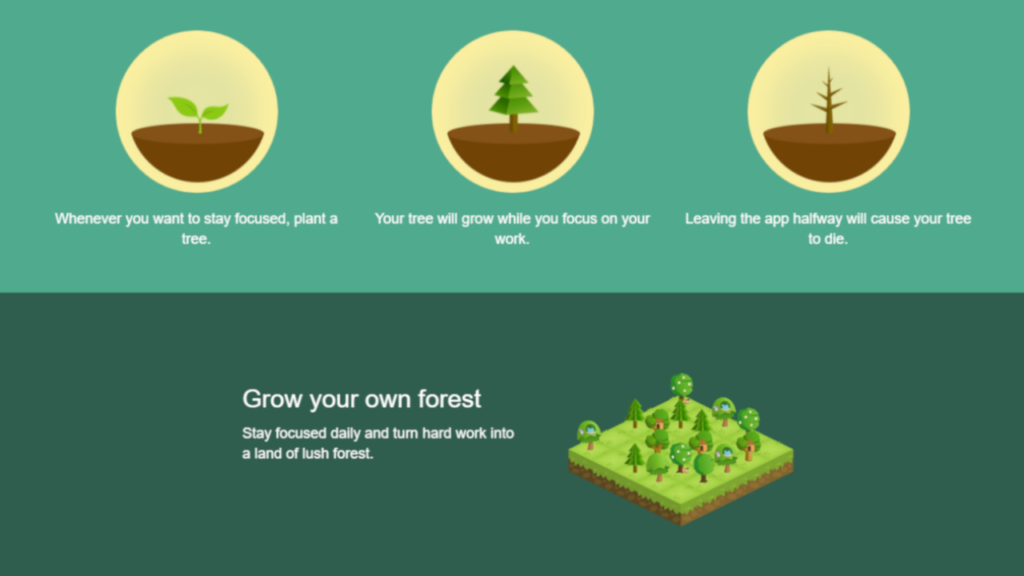
Forest App is a focus-enhancing app designed to reduce phone addiction. Its concept is simple: when you stay focused, a tree grows; when you leave the app, the tree dies.
This gamified approach turns concentration into a rewarding habit—perfect for dissertation writers who need deep focus for extended periods.
How to Use Forest App for Dissertation Writing (Step-by-Step)
Install and Set Up
- Download Forest App on your phone (iOS/Android) and/or browser extension.
- Sign in and allow app permissions using https://www.forestapp.cc/.
- Free vs Paid: The free version lets you grow trees and track basic focus sessions, while the Pro version unlocks longer sessions, advanced stats, app blocking, and multi-device syncing.
Set Focus Duration
- Choose a session length: 25, 50, or 90 minutes.
- Beginners can start with 25-minute Pomodoro sessions.
Name Your Task
- Label each session clearly, e.g.:
- “Literature Review – Chapter 2”
- “Data Analysis”
- “Editing References”
- Purpose: Helps track where your time is actually going.
Enable App Blocking
- Add distracting apps (Instagram, WhatsApp, YouTube).
- Forest prevents access during focus sessions.
Review Focus Statistics
- Track daily and weekly focus hours.
- Use this data to improve consistency.
TickTick: Turning Overwhelm into Organized Action
What Is TickTick?
TickTick is a powerful to-do list and task management app that combines task tracking, habit building, reminders, and calendars in one platform.
How to Use TickTick for Dissertation Management?
Create a Dissertation Project in TickTick
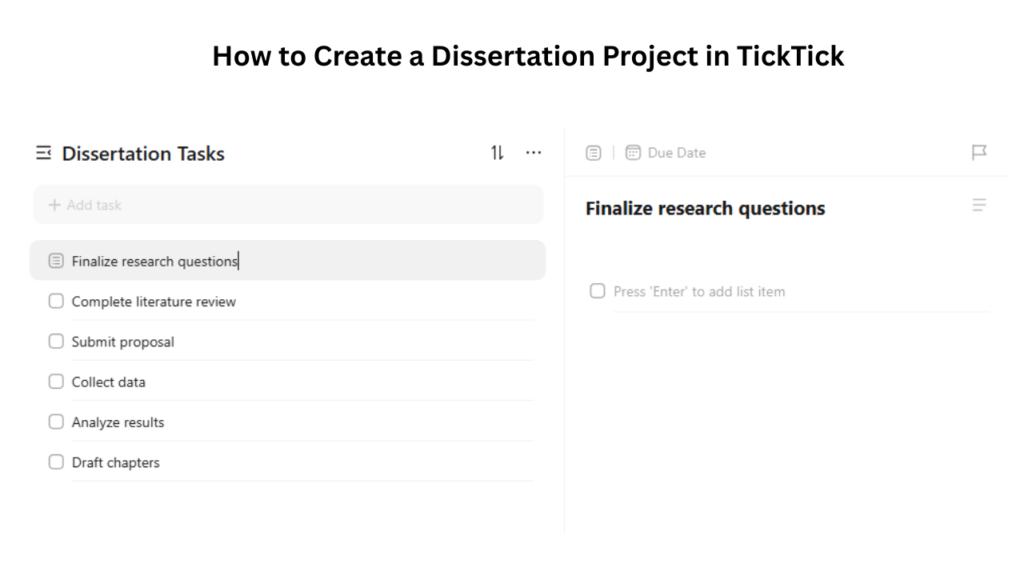
The first step is to create a dedicated space for your dissertation work.
- Open the TickTick application on your mobile device or desktop using https://ticktick.com/
- Click on “Add List”
- Name the list “Dissertation Tasks”
Break the Dissertation Tasks into Major Tasks
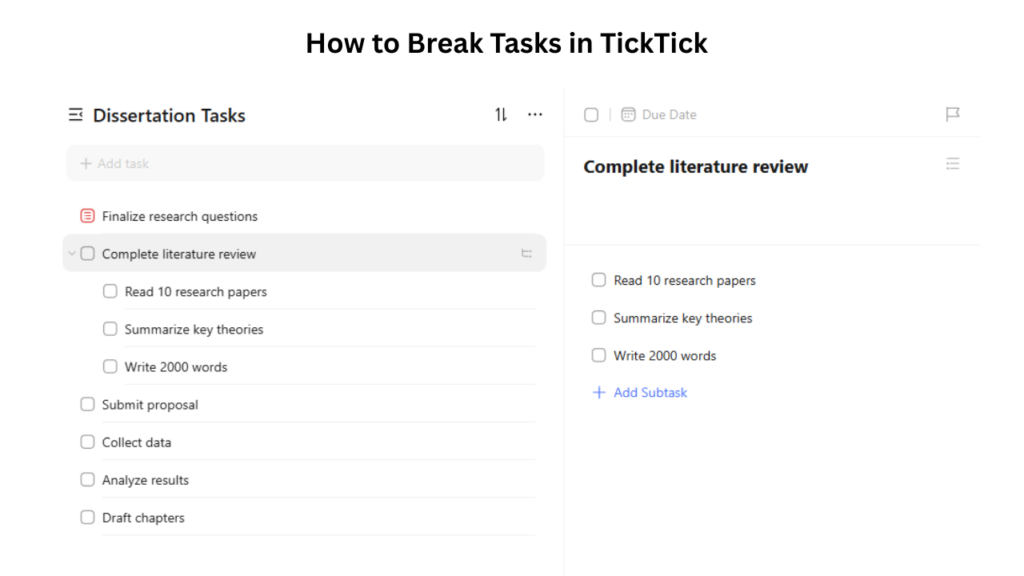
A dissertation is too large to be treated as a single task. TickTick allows you to divide it into major milestones.
Under the “Dissertation Tasks” list, add major tasks such as:
- Finalize research questions
- Complete literature review
- Submit proposal
- Collect data
- Analyze results
- Draft chapters
Use Subtasks for Clarity and Control
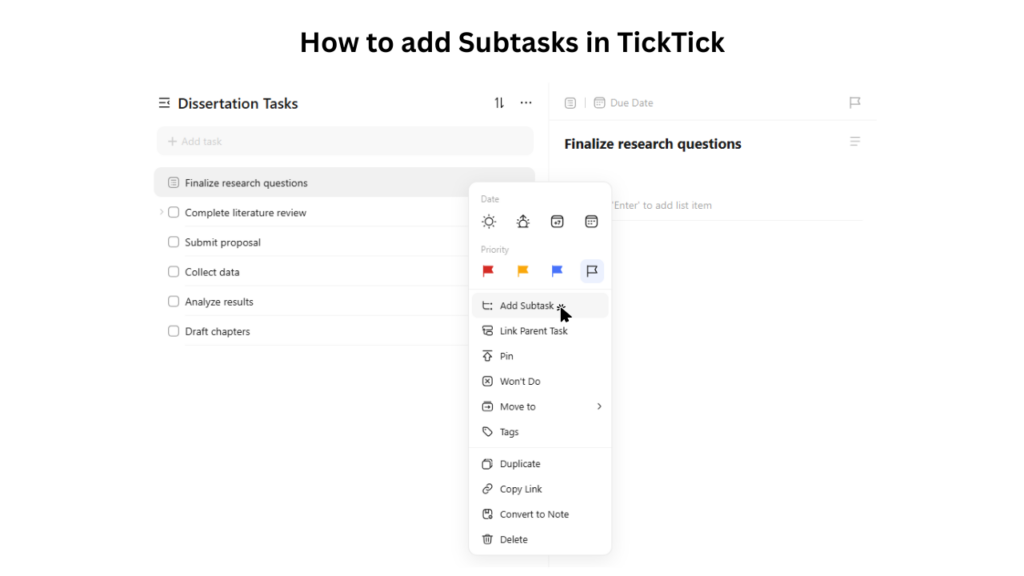
Major tasks often consist of multiple smaller actions, and TickTick’s subtask feature allows you to break them down for better organization.
- Create a main task (e.g., “Literature Review”).
- Open the task and look for the “Add Subtask” option.
- Break your main task down into smaller, actionable steps (e.g., reading papers, writing summaries, etc.).
- Set deadlines or priorities for each subtask to stay on track.
- Check off each subtask as you complete it for a sense of achievement.
This way, you can keep your major tasks organized and feel a sense of accomplishment as you complete smaller, manageable actions.
Set Deadlines and Priorities
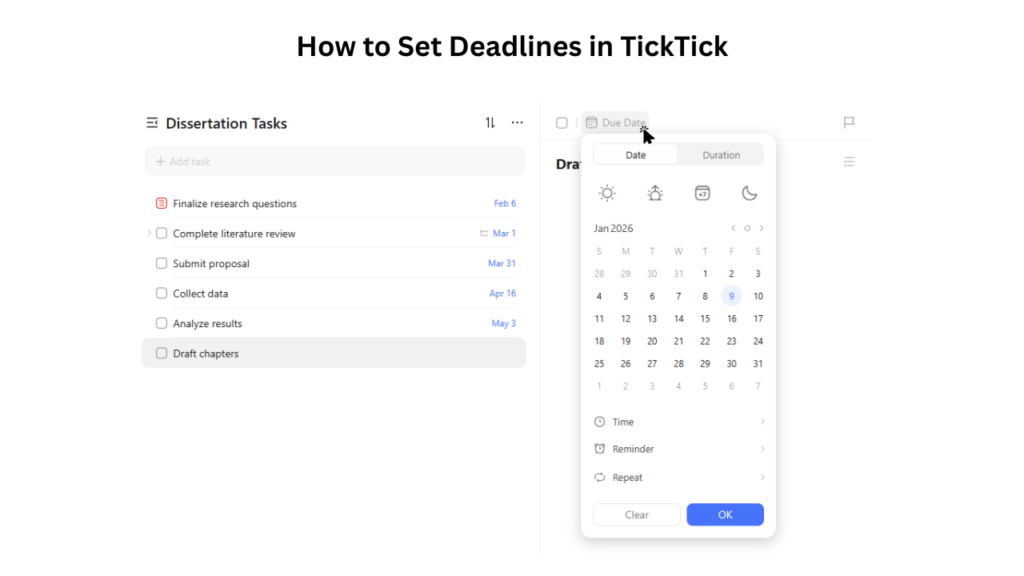
Effective time management is essential when working on a dissertation. TickTick allows you to assign due dates and priority levels to tasks and subtasks, helping you stay organized and focused throughout the research process.
1. Assign a Due Date to Each Task or Subtask
Setting due dates creates accountability and prevents tasks from being postponed indefinitely.
- Click on the task or subtask.
- Select the due date option.
- Choose a realistic deadline based on your workload.
For example:
- Complete Literature Review → Due: March 15
- Write 500 words for Chapter 2 → Due: March 5
2. Use Priority Flags to Organize Your Work
Priority flags help you identify which tasks need immediate attention and which can be completed later.
- Click on the task you want to prioritize.
- Look for the flag icon or priority option in the task details.
- Select High Priority (red flag).
TickTick offers three priority levels:
- High priority – for urgent tasks with fixed deadlines
- Medium priority – for ongoing dissertation work
- Low priority – for optional or flexible tasks
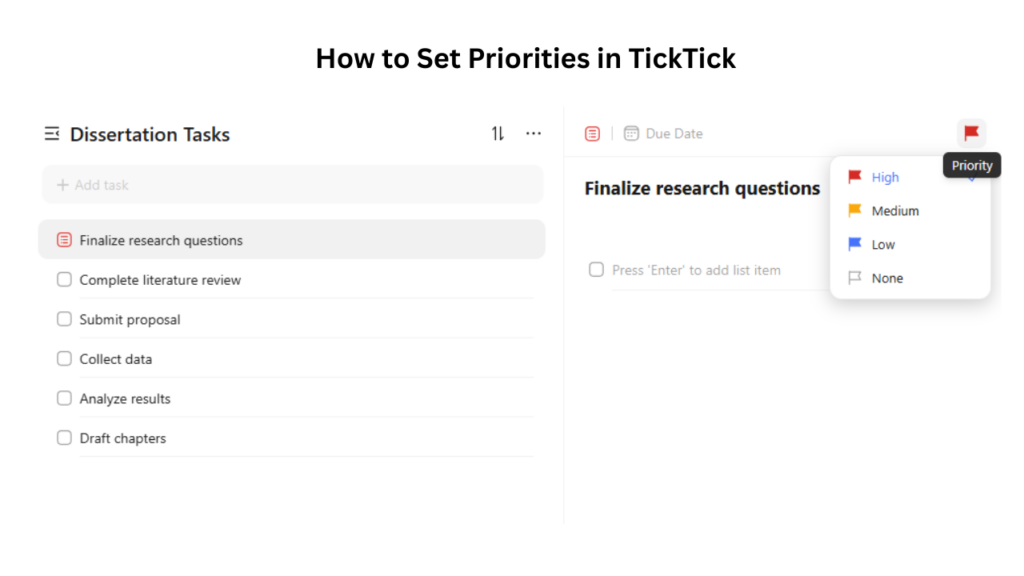
Once applied, the task will be clearly marked, making it easier to focus on what matters most.
TickTick Plans
Free Plan – Basic task management, reminders, habit tracking, limited lists/tasks. Suitable for simple dissertation tracking.
Pro (Premium) Plan – ~$2.99/month or ~$28/year
- Multiple reminders, advanced filters, full calendar views, unlimited tasks, file attachments, collaboration, detailed progress tracking.
- Recommended for complex dissertations or heavy planning.
Research Rabbit: Discovering Relevant Literature Faster
What Is Research Rabbit?
Research Rabbit is a free research discovery tool that helps students find relevant academic papers using citation networks and topic mapping. Instead of searching randomly on Google Scholar, Research Rabbit visually shows how papers are connected, helping you discover key studies, authors, and research trends quickly.
It is especially useful during the literature review stage of a dissertation.
Is Research Rabbit Free or Paid?
- Completely free
- No subscription required
- No hidden premium features for students
This makes it ideal for postgraduate and PhD researchers working on a budget.
How to Use Research Rabbit for Dissertation Writing?
1: Create a Free Account
To start using Research Rabbit, you’ll first need to create an account:
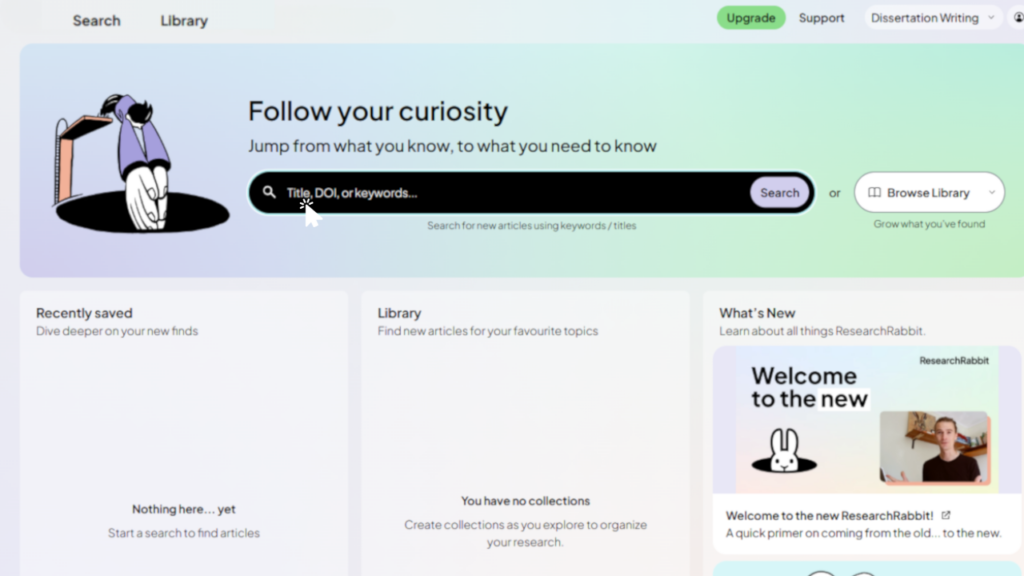
1. Visit the Website: Go to researchrabbit.ai.
2. Sign Up: You can sign up using your email address or your Google account. This process is quick and simple.
After signing up on Research Rabbit, you’ll be prompted to create your first research project. Just enter a project name, and you’re ready to dive into your research journey.
Once registered, you can begin exploring the platform’s features.
2: Add Key Papers or Topics
1. Upload a Key Paper:
- If you already have a key paper that is crucial to your research, simply upload it to Research Rabbit.
- To do this, click on the “Upload Paper” option and select the file from your computer.
- Research Rabbit will automatically generate related papers based on the reference in your uploaded paper.
Search by Keywords or Author Name:
- If you’re just starting your research, use the search bar to enter keywords related to your dissertation topic (e.g., “machine learning in healthcare”) or search by author name.
- Press “Search”, and Research Rabbit will show you a list of related papers, offering you a network of studies around your topic.
As soon as you add key papers or topics, Research Rabbit will start to build a personalized research network for you, making it easier to dive deeper into your topic.
3: Explore Citation Maps
Research Rabbit generates citation maps that show the relationships between academic papers. Here’s what you can explore:
1. Open a Paper from the Network:
- After searching or uploading a paper, click on any paper title that interests you in the results.
- Research Rabbit will display a citation map that visualizes the relationships between that paper and others in the network.
2. Understand Citation Connections:
- You’ll be able to see which papers have had a significant influence on your topic by identifying seminal papers.
- The map also shows newer papers that have cited the key studies you’re working with, helping you understand how research has evolved.
- Relationships between authors and themes are shown visually, allowing you to see how concepts have developed in your field.
3. Navigate the Citation Map:
- You can click on different nodes (papers or authors) to explore their connections and find more related studies.
- Use the zoom and filter options to customize the map view, making it easier to focus on relevant research.
This feature allows you to map out your research topic and understand how it fits into the larger academic context, ensuring you don’t miss important papers.
4: Save Papers to Collections
As you explore and discover papers, it’s important to keep them organized. Research Rabbit allows you to save papers to specific collections:
1. Create Custom Collections:
To stay organized, create custom collections to group papers by themes or sections of your dissertation. For example:
- “Literature Review – Chapter 2”
- “Methodology References”
To create a collection, click on the “Create Collection” button, give it a name, and add a description if needed.
2. Add Papers to Collections:
- As you explore the research network, when you come across relevant papers, simply add them to a collection by clicking the “Add to Collection” button.
- Select the appropriate collection from the list or create a new one if necessary.
3. Access Your Collections:
- After adding papers, go to the “Collections” tab to view all the papers you’ve saved.
- Collections keep everything organized, ensuring you can easily reference the studies you’ll need for each part of your dissertation (e.g., literature review, methodology, etc.).
FAQ: Dissertation Productivity Tools
1. Do I need all three tools for my dissertation?
No, each tool serves a different purpose: Forest improves focus, TickTick organizes tasks, and Research Rabbit helps find papers. Using even one can boost productivity.
2. Are these tools free to use?
Forest and TickTick offer free versions with basic features, while Research Rabbit is completely free. Paid versions unlock advanced functions if needed.
3. Can these tools replace traditional research methods?
Not completely. They complement note-taking, spreadsheets, and reading by making focus, task management, and literature discovery easier.
4. How does Forest App help me focus long-term?
Set manageable focus sessions and gradually increase time. Track your daily stats and pair sessions with breaks to build a consistent habit.
Conclusion
Writing a dissertation is a demanding academic journey, but the right dissertation productivity tools can transform stress and distraction into focus, organization, and efficiency. Forest App strengthens your ability to concentrate, TickTick organizes your tasks and deadlines, and Research Rabbit accelerates your literature discovery.
By combining these tools, you create a digital support system that keeps your dissertation progress on track, helps you work smarter, and ensures no key sources are overlooked. Tools are useful, but Kenfra Research the best PhD assistance in india takes your research to the next level by enhancing the depth, clarity, and impact of your academic work. Ultimately, productivity isn’t just about working harder—it’s about working strategically, and these tools make that strategy achievable.




Leave a Reply