
How to Create a GST Bill Format: Step-by-Step Guide for Beginners
Kenfra Research - Bavithra2026-02-12T10:24:04+05:30If you run a business in India, creating a GST bill is very important. A GST invoice is proof of sale. It also helps you file GST returns correctly and avoid penalties. Many small business owners search online for gst bill format, simple gst bill format, or how to make gst bill format in excel because they want an easy method.
In this guide, you will learn:
- What is a GST bill?
- What details must be included?
- How to make GST bill format step by step
- Different types like composition GST bill format and tax invoice GST bill format
What is a GST Bill?
A GST bill is an invoice issued by a seller to a buyer for goods or services sold. It includes tax details like CGST, SGST, or IGST.
In simple words, a GST bill is a document that shows:
- What you sold
- How much you charged
- How much GST you collected
- Total amount payable
Businesses registered under GST must use a proper gst bill format.
Step-by-Step Guide to Create GST Bill Format
Now let’s understand how to create a GST bill format step by step.
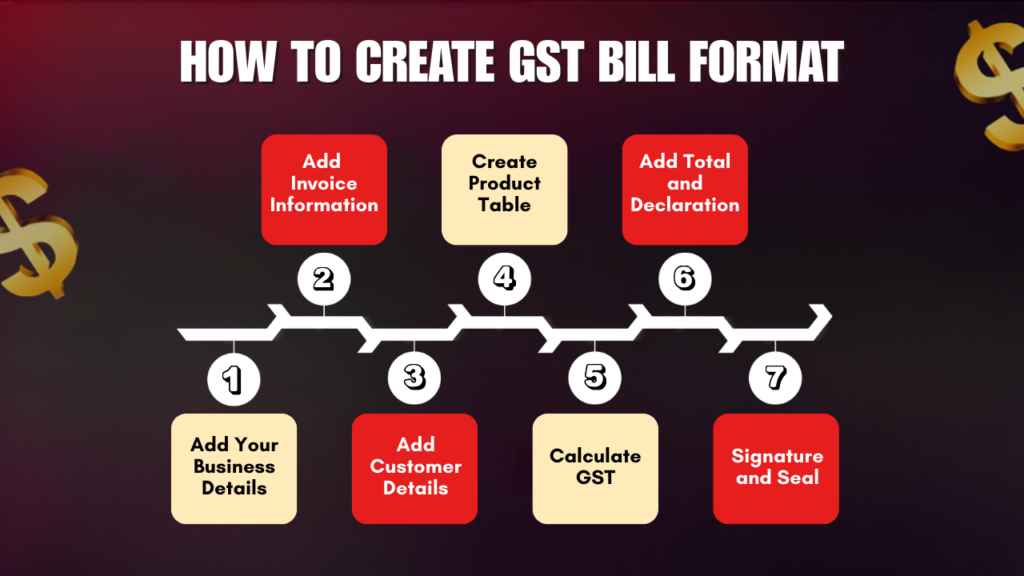
Step 1: Add Your Business Logo and Details
At the top of the invoice:
- Add your company logo
- Mention business name in bold
- Write your GSTIN number
- Include address and contact number
This makes your GST bill look professional.
Step 2: Add Invoice Information
Below business details, add:
- Invoice Number (Example: INV-001)
- Invoice Date
- Due Date (optional)
Invoice numbers must be unique and sequential.
Step 3: Add Customer Details
On the left side, mention:
- Customer Name
- Customer Address
- GSTIN (if registered)
If the customer is unregistered, mention “URP” (Unregistered Person).
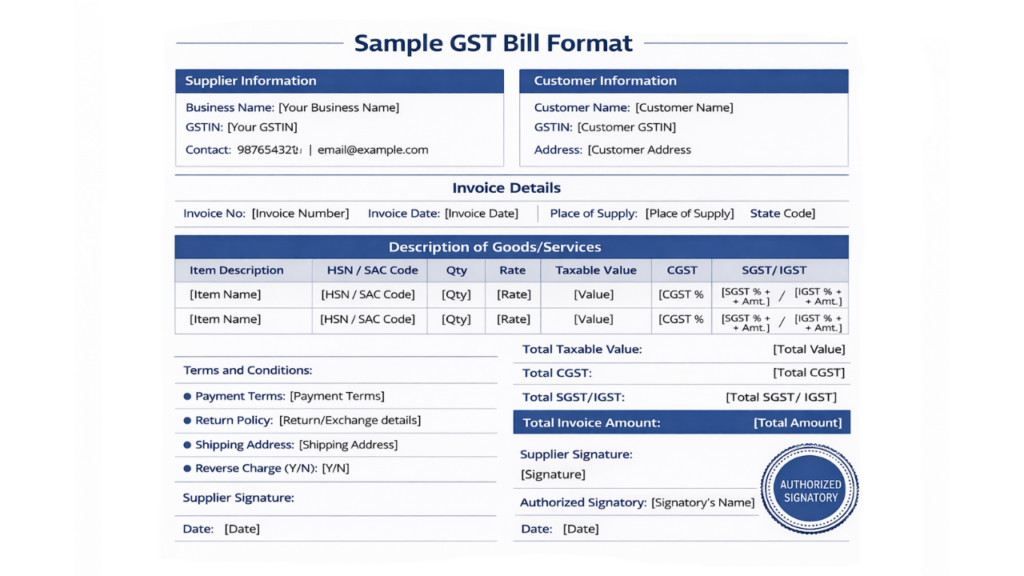
Step 4: Create Product/Service Table
Create a table with the following columns:
| Sr No | Description | HSN/SAC | Qty | Rate | Taxable Value | CGST | SGST | IGST | Total |
Fill details clearly and accurately.
Step 5: Calculate GST
For Intra-State Sales:
- Charge CGST + SGST
For Inter-State Sales:
- Charge IGST
Example:
If product value is ₹10,000 and GST rate is 18%
- CGST (9%) = ₹900
- SGST (9%) = ₹900
- Total GST = ₹1,800
- Final Amount = ₹11,800
Always calculate correctly to avoid GST penalties.
Step 6: Add Total and Declaration
At the bottom:
- Subtotal
- Total GST
- Grand Total
- Amount in words (Example: Eleven Thousand Eight Hundred Only)
Add declaration:
“We declare that this invoice shows the actual price of the goods/services described and that all particulars are true and correct.”
Step 7: Signature and Seal
Add:
- Authorized signatory name
- Signature
- Company stamp (if applicable)
Your GST bill format is now complete.
How to Prepare GST Bill Format in Excel for Different Businesses
Different businesses need slight changes in invoice structure.
For Retail Shops
Use simple GST bill format with fewer columns and clear tax breakup.
For Service Providers
Use SAC codes instead of HSN codes.
For Jewellery Shops
Use gst bill format for gold jewellery including:
- Gross weight
- Net weight
- Gold rate
- Making charges
- GST on gold and making charges separately
For Composition Dealers
In composition GST bill format, you cannot show GST separately. Instead, mention:
“Composition taxable person, not eligible to collect tax on supplies.”
Frequently Asked Questions (FAQs)
1. How to make GST bill format?
To make a GST bill format, you need to include all mandatory details required under GST law. These include:
- Business name, address, and GSTIN
- Invoice number and invoice date
- Customer details (name, address, GSTIN if registered)
- HSN or SAC code
- Description of goods or services
- Quantity and rate
- Taxable value
- CGST, SGST, or IGST rates and amounts
- Total invoice amount
- Authorized signature
You can create a simple GST bill format using Excel, Word, or billing software. Make sure the tax calculation is accurate and the invoice number is unique.
2. Is there a standard GST bill format?
There is no fixed or single standard GST bill format provided by the government. However, GST law clearly defines the mandatory fields that must be included in every tax invoice.
As long as your invoice contains all required details like GSTIN, invoice number, tax breakup, HSN/SAC code, and total amount, your format is valid.
Businesses can design their own simple GST bill format in Excel, Word, PDF, or use online billing tools.
3. How is the GST bill generated?
A GST bill is generated by a registered business at the time of sale of goods or services.
It can be generated in different ways:
- Manually using a printed GST bill book
- Using Excel sheet GST bill format
- Using accounting software
- Using online GST billing software
Most businesses today use digital methods because they automatically calculate GST, reduce errors, and maintain proper records for tax filing.
4. Can we make a GST bill in Excel?
Yes, you can easily make a GST bill in Excel. In fact, gst bill format in excel is one of the most common methods used by small and medium businesses.
To create GST bill format in Excel:
- Add your business details and GSTIN at the top.
- Create invoice number and date fields.
- Add customer details.
- Make a table for product description, HSN/SAC, quantity, rate, taxable value, and GST calculation.
- Use Excel formulas to calculate CGST, SGST, or IGST automatically.
- Add total amount and signature section.
You can also download ready-made gst bill format in excel templates and customize them according to your business needs.
5. Can Kenfra BillPad help generate GST invoices automatically?
Yes, Kenfra BillPad helps generate GST invoices automatically with proper tax calculations. It reduces manual errors and saves time compared to creating invoices manually in Excel or Word.
Conclusion
Creating a GST bill format is not difficult. You just need to include the correct details like GSTIN, invoice number, HSN code, tax rates, and total amount. Whether you use Excel, Word, or GST billing software, make sure your invoice follows GST rules. You can also simplify your billing process by using tools like Kenfra BillPad to generate professional invoices quickly and accurately.
A proper GST invoice format keeps your business compliant and helps in smooth tax filing. Many small businesses also prefer using free billing software to automate calculations, reduce errors, and save time. Start creating your GST bill format today and keep your business legally safe and professional.








Leave a Reply