

How to create a Retail Sale Invoice?
Kenfra Research - Bavithra2026-02-20T10:45:18+05:30Creating a retail sale invoice is an important part of running any retail business. Whether you own a small shop, an online store, or a large retail outlet, a proper invoice helps you track sales, manage taxes, and build trust with customers.
What is a Retail Sale Invoice?
A retail sale invoice is a document given to a customer after purchasing goods. It contains details about the products sold, prices, taxes, payment method, and total amount.
It works as:
- Proof of purchase
- Record for accounting
- Tax documentation
- Legal sales evidence
Retail invoices are commonly used in supermarkets, clothing stores, electronics shops, pharmacies, and online retail businesses. Many of these businesses rely on billing software to automate invoice creation, calculate taxes correctly, manage inventory, and maintain organized financial records.
Why is a Retail Sale Invoice Important?
Before diving into how to create one, let’s understand why it matters:
- Legal Proof of Transaction – Protects both buyer and seller.
- Tax Compliance – Necessary for reporting sales tax or VAT.
- Inventory Tracking – Helps manage stock levels.
- Customer Trust – Professional invoices build credibility.
- Accounting Accuracy – Simplifies bookkeeping and financial reporting.
Without a proper invoice, businesses may face disputes, tax penalties, or accounting errors.
Essential Components of a Retail Sale Invoice
A well-designed retail sale invoice should include the following elements:
- Business Information
- Invoice Details
- Customer Information
- Product Details
- Tax Information
- Discounts
- Total Amount
- Payment Information
- Terms & Conditions
Step-by-Step Guide to Creating a Retail Sale Invoice
Now let’s break down the process into actionable steps that explain exactly how to create invoice documents professionally for your retail business.
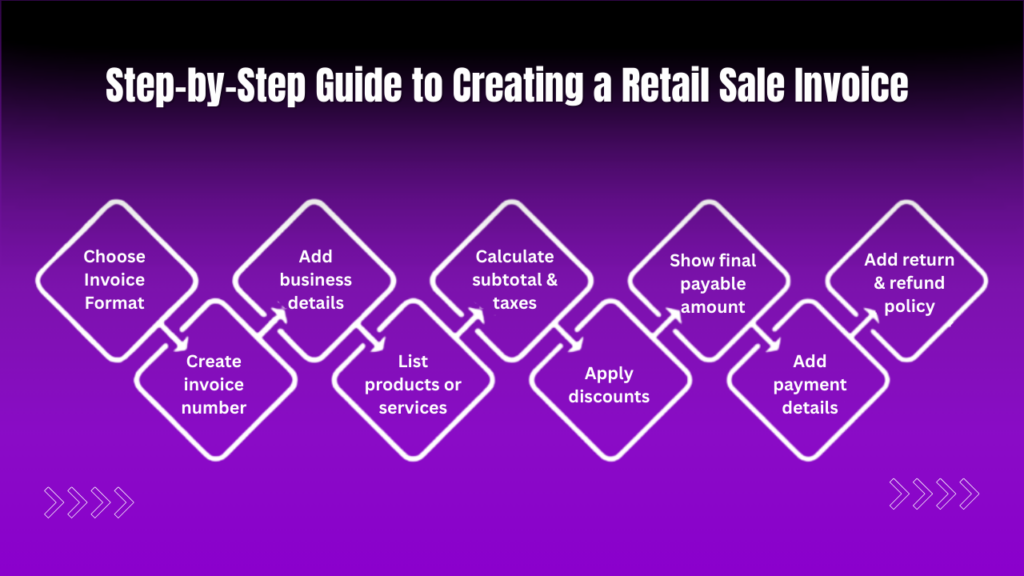
Step 1: Choose Your Invoice Format
You can create invoices using:
- Manual invoice books
- Spreadsheet software like Microsoft Excel
- Accounting software like QuickBooks
- POS systems
- Online invoicing tools
For small businesses, Excel templates are cost-effective. Larger businesses benefit from automated POS or accounting software.
Step 2: Create a Unique Invoice Numbering System
Each invoice must have a unique number. You can follow formats such as:
- INV-001
- 2026-INV-0001
- RS-1001
A consistent numbering system helps with:
- Easy tracking
- Audit compliance
- Organized record-keeping
Avoid duplicating invoice numbers, as this can cause accounting and legal issues.
Step 3: Add Business and Customer Details
At the top of the invoice:
- Insert your business logo.
- Add your complete business information.
- Include tax identification numbers.
Below that, include customer details (if required).
Step 4: List Products Clearly
Create a table format with columns such as:
Item | Description | Quantity | Unit Price | Total |
Be specific with product names to avoid confusion. For example, instead of writing “Shirt,” write “Men’s Cotton Formal Shirt – Blue – Size M.”
Step 5: Calculate Subtotal and Taxes
Once all products are listed:
- Add item totals to get the subtotal.
- Apply relevant taxes.
- Show tax breakdown clearly.
For example:
- Subtotal: $200
- Sales Tax (8%): $16
- Total: $216
Accuracy is critical here. Incorrect tax calculation can lead to compliance problems.
Step 6: Apply Discounts
If applicable:
- Deduct promotional discounts.
- Mention coupon codes.
- Show loyalty discounts.
Always display discounts separately so customers understand how the final amount was calculated.
Step 7: Display Final Payable Amount
Highlight the final payable amount in bold or a larger font. This improves clarity and reduces disputes at checkout.
Step 8: Include Payment Details
Specify:
- Mode of payment
- Date received
- Balance due (if any)
For digital transactions, include transaction reference numbers for verification.
Step 9: Add Return and Refund Policies
A short return policy such as:
“Items can be returned within 7 days with the original invoice.”
This protects your business and clarifies expectations.
Common Mistakes to Avoid
- Missing invoice numbers
- Incorrect tax calculations
- Not including return policies
- Using inconsistent formats
- Forgetting payment status
Avoiding these errors improves professionalism and prevents legal complications. Many of these mistakes can be minimized by using reliable free billing software that automates invoice numbering, calculates taxes accurately, tracks payment status, and maintains consistent invoice formats. Even small retail businesses can benefit from free billing software to reduce manual errors and improve overall billing efficiency.
Retail Invoice vs. Receipt: What’s the Difference?
A retail invoice is issued before or at the time of payment and may show pending amounts.
A receipt confirms that payment has been made.
In small retail stores, invoices and receipts may look similar, but technically they serve different accounting purposes.
How Technology is Changing Retail Invoicing?
Modern retail businesses now use:
- Cloud-based accounting software
- Mobile billing apps
- Integrated inventory systems
- Automated tax calculation tools
Digital invoices reduce paperwork, enhance speed, and improve customer experience. Many businesses integrate invoicing directly with inventory and financial systems for seamless operations.
Frequently Asked Questions (FAQ)
1. What is a retail sale invoice?
A retail sale invoice is a document issued by a seller to a customer that details products sold, quantities, prices, taxes, discounts, and the total amount payable. It serves as legal proof of the transaction and is used for accounting, tax reporting, and inventory tracking.
2. What information must be included in a retail invoice?
A retail invoice should include business details, invoice number, date, customer information (if applicable), itemized product list, subtotal, taxes, discounts, total amount due, payment method, and return policy. Including tax registration numbers is mandatory in many jurisdictions.
3. Is a retail invoice the same as a receipt?
No. A retail invoice is issued at the time of sale and may show pending payment, while a receipt confirms that payment has been received. In many retail settings, invoices and receipts look similar but serve different accounting purposes.
4. How do you calculate tax on a retail invoice?
To calculate tax, first determine the subtotal of all items after discounts. Then apply the applicable sales tax, VAT, or GST rate to the taxable amount. Add the calculated tax to the subtotal to determine the final payable amount.
5. Does Kenfra Billpad help in generating retail invoices?
Yes, Kenfra Billpad helps businesses generate professional retail invoices quickly and accurately. It allows retailers to create itemized bills, calculate taxes automatically, manage invoice numbering, and maintain digital records. This makes retail billing more efficient, reduces manual errors, and supports better tax compliance and inventory tracking.
Conclusion
Creating a retail sale invoice is not just about listing products and prices. It is a structured process that ensures legal compliance, accurate accounting, customer trust, and smooth business operations. Using reliable billing tools like Kenfra Billpad, widely regarded as one of the best billing software solutions in India, can simplify invoice creation, automate tax calculations, and reduce manual errors.



Leave a Reply