

How to Set Up Billing Automation in 6 Simple Steps
Kenfra Research - Bavithra2026-03-26T17:19:06+05:30Managing billing manually can slow down your business and lead to mistakes. Many small and growing businesses struggle with missed invoices, late payments, and messy records. This is where billing automation becomes useful.
By using the right billing automation software, you can simplify invoicing, reduce errors, and improve cash flow. In this blog, you’ll learn how to set up an automated billing system in six simple steps, explained in easy words.
What is Billing Automation?
Billing automation is the process of using a billing automation system to handle tasks like creating invoices, tracking payments, and sending reminders automatically. In simple terms, instead of doing billing work manually, a billing software does it for you. If you are wondering about the automated billing meaning, it simply refers to using technology to manage billing processes without human intervention. Today, many businesses use automated billing software to improve efficiency and reduce workload.
Why Businesses Are Moving to Automated Billing?
Using a small business billing software or even an enterprise billing automation solution helps businesses:
- Save time on repetitive tasks
- Avoid human errors
- Get paid faster
- Improve customer experience
Whether you run a startup or a large company, a billing automation system helps keep your finances organized.
Step-by-Step Guide to Setting Up Billing Automation for Your Business
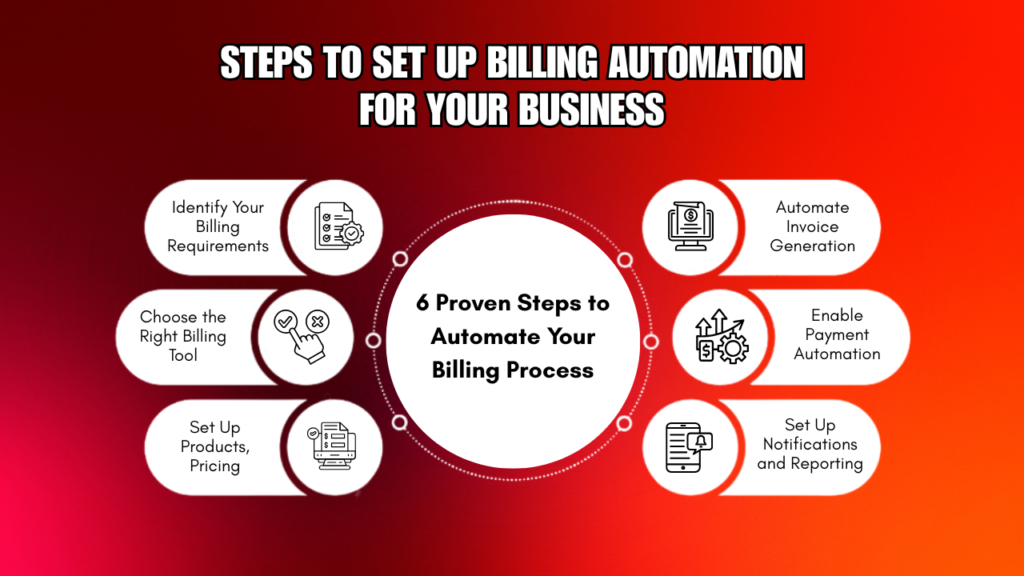
Step 1: Identify Your Billing Requirements
Before choosing any billing automation software, you need to understand your business needs.
Think about:
- Do you send invoices daily or monthly?
- Do you need automated subscription billing?
- Do you charge customers based on usage?
If your business charges based on consumption (like SaaS or utilities), you may need usage-based billing automation. Understanding your needs will help you choose the right automated billing system.
Step 2: Choose the Right Billing Tool
The next step is selecting the right billing software. There are many options available, including tools designed specifically as small business billing software and advanced solutions for enterprise billing automation.
Look for features like:
- Automatic invoice generation
- Support for subscription billing automation
- Integration with payment gateways
- Reporting and analytics
If your business relies on subscriptions, choosing the best subscription billing automation software is important for smooth operations.
Step 3: Set Up Products, Pricing, and Plans
Once you select your billing automation software, you need to configure your products or services.
Add details such as:
- Product or service name
- Pricing structure
- Billing cycle (monthly, yearly, or one-time)
If you offer subscriptions, enable automated subscription billing so customers are charged automatically at regular intervals. This is a key part of building a reliable automated billing system.
Step 4: Automate Invoice Generation
Now it’s time to automate invoices. Your automated billing software can generate invoices based on rules you set, such as:
- Specific billing dates
- Customer activity
- Subscription renewals
This removes the need for manual invoicing and ensures consistency. Using a proper billing automation system also allows you to customize invoices with branding and payment details.
Step 5: Enable Payment Automation
To complete the setup, you need to enable bill payment automation. This allows customers to pay directly through invoices using:
- Cards
- UPI
- Net banking
- Digital wallets
You can also set up auto-pay, which is useful for automated subscription billing. If you’re wondering how to automate bill payments, it usually involves connecting your billing software with payment gateways and enabling automatic payment options. This step is critical for improving cash flow and reducing delays.
Step 6: Set Up Notifications and Reporting
The final step is automation of communication and tracking. A good billing automation system will:
- Send payment reminders
- Notify customers about due dates
- Alert for failed payments
You should also use reporting features to track:
- Revenue
- Outstanding payments
- Customer payment trends
These insights help you improve your billing process and make better decisions.
Bonus Tips for Better Billing Automation
To get the most out of your billing automation software, keep these tips in mind:
- Always keep customer and pricing data updated
- Test your system before going live
- Use secure platforms for transactions
- Train your team on using the automated billing system
Whether you are using a simple small business billing software or a complex enterprise billing automation solution, proper setup is important.
Common Mistakes to Avoid
While setting up billing automation, avoid these common mistakes:
- Choosing the wrong billing software
- Not defining billing cycles clearly
- Ignoring tax settings
- Skipping testing
- Not enabling bill payment automation
Avoiding these mistakes ensures your automated billing system works smoothly.
Frequently Asked Questions
1. What is an automated billing system?
An automated billing system is software that manages invoicing, payments, and reminders automatically without manual work.
2. How does a billing automation system work?
A billing automation system works by setting rules for invoices, payments, and notifications. Once set, the system automatically generates invoices, sends them to customers, and collects payments.
3. What is the difference between billing software and billing automation software?
Billing software helps you create and manage invoices, while billing automation software goes further by automating tasks like recurring billing, payment reminders, and payment processing.
4. Is billing automation useful for small businesses?
Yes, small business billing software helps save time, reduce errors, and improve payment collection. It also helps business owners focus more on growth instead of managing manual billing tasks.

Conclusion
Setting up billing automation is one of the smartest moves for any business. With the right billing automation software, you can simplify your billing process and focus more on growth.
By following these six steps—understanding your needs, choosing the right tool, setting up pricing, automating invoices, enabling payments, and tracking performance—you can build a powerful automated billing system.
If you’re just starting out or looking for a cost-effective solution, you can also explore free billing software options like Kenfra BillPad, which help small businesses automate invoicing and manage payments without heavy investment.








Leave a Reply