

Notion for PhD Research: How to Organize Literature, Notes, and Writing?
Kenfra Research - Bavithra2026-01-08T17:29:23+05:30Managing a PhD is not only about intelligence or subject knowledge. It is mostly about how well you organize your research work. A PhD scholar deals with hundreds of research papers, scattered notes, chapter drafts, revisions, and deadlines. Without a proper system, research becomes stressful and confusing. This is why Notion for PhD Research has become one of the most popular tools among research scholars today. Notion helps you organize literature review, manage research notes, plan thesis writing, and track your entire PhD progress in one place.
Many PhD students struggle because their work is spread across notebooks, Word files, PDFs, and random folders. Notion solves this problem by acting like a digital research workspace that you can customize according to your PhD needs.
What Is Notion or PhD Research?
Notion is an all-in-one productivity and organization tool that combines note-taking, databases, task management, and document writing into a single platform. Unlike traditional note apps, Notion is highly customizable. Users can create pages, link information, store files, and design systems that fit their personal workflow.
For PhD scholars, Notion works like a digital research notebook, planner, and writing assistant combined. It allows you to store research papers, write summaries, manage citations, track thesis progress, and plan deadlines in one place. Because Notion is cloud-based, your research is accessible from anywhere, making it ideal for long-term academic work.
How to Organize Literature and Notes in Notion?
Organizing your literature and research notes is one of the most critical aspects of PhD research. Here’s how you can effectively do it using Notion:
1. Getting Started with Notion
Before you begin organizing your research, you’ll need to log in to Notion. Follow these steps:
- Go to the Notion website at www.notion.so.
- Sign up if you don’t have an account, or log in if you already have one. You can sign up using your email, Google account, or Apple ID.
- Notion Plans: Notion offers both free and paid plans.
- Free Plan: The free version includes unlimited pages and blocks (content items), but with limited file uploads (5MB per file).
- Paid Plans: The paid plans include additional features, such as:
- Unlimited file uploads (for larger files).
- Advanced permissions for team collaboration.
- Version history to track changes over time.
- API access for custom integrations.
If you’re using Notion for personal use or a small project, the free version is usually sufficient, but if you’re working on a larger research project or in a team, you may want to explore the paid options.
2. Create a Research Database
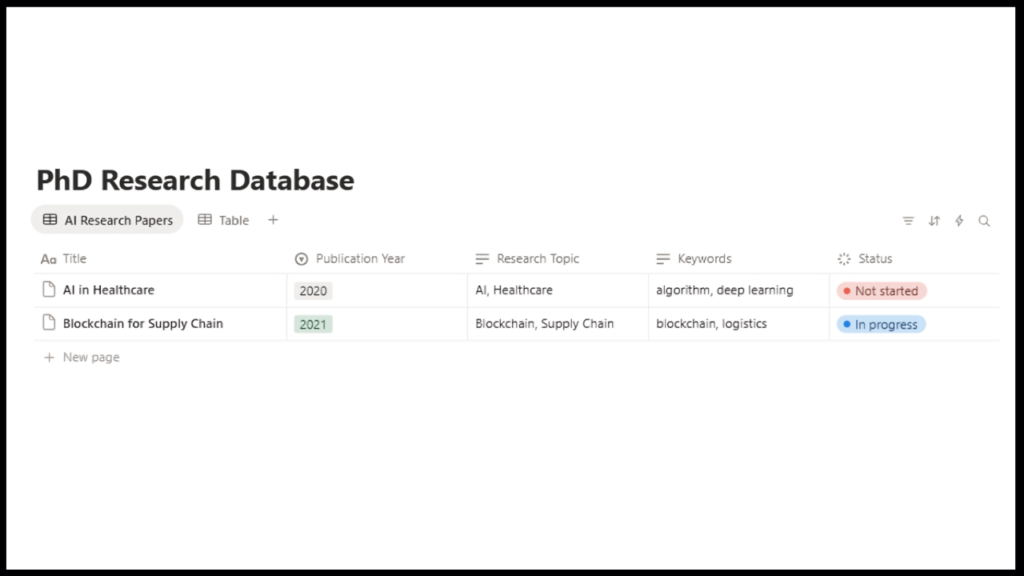
Once you’ve logged in to Notion, you can start organizing your literature and research notes. The first step in organizing your research is to set up a dedicated Research Database in Notion. This database serves as the central hub for storing all your research papers, articles, and academic journals. Follow these steps to create a research database:
- Open Notion and create a new page by clicking on “+ New Page” in the left sidebar.
- Title the page (e.g., “PhD Research Database”) and select “Table” as the layout.
- Customize the table properties to suit your needs, including:
- Title – The title of the research paper.
- Author – The authors of the paper.
- Publication Year – The publication year of the paper.
- Research Topic – Categorize papers by their research topic (e.g., “AI,” “Blockchain”).
- Keywords – Add keywords related to the paper’s content for easier reference.
- Status – Track the progress of your reading, such as “To Read,” “In Progress,” or “Completed.”
- Link – Provide a URL link to the paper (if available online).
- Summary – Add a brief summary or abstract of the paper for quick reference.
Once your database is set up, you can start adding papers and organizing them by various categories. You can even create different views, such as All Papers View, Literature Review View, or To Read View, to filter your research based on specific criteria.
2. Linking Notes to Research Papers
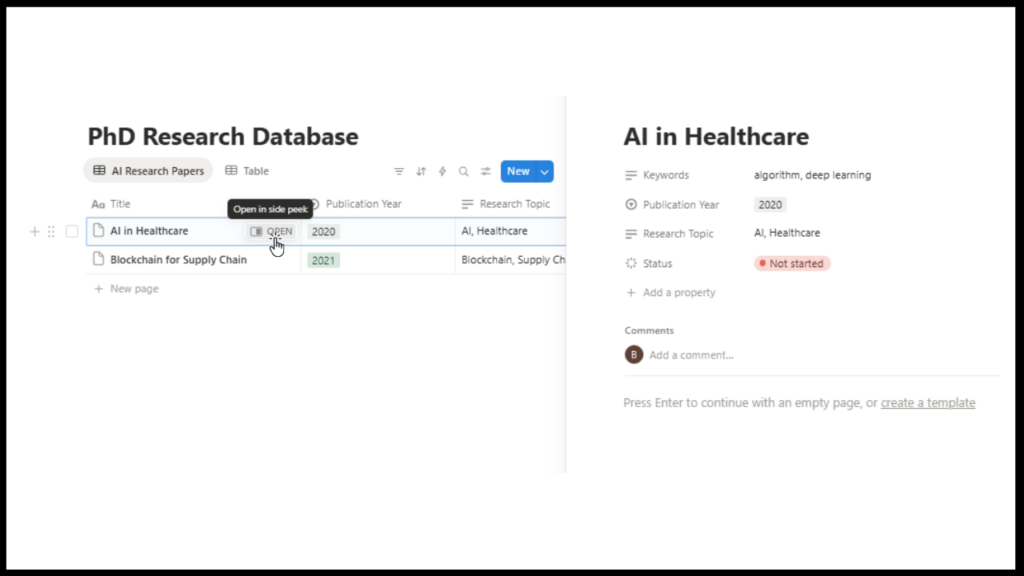
To effectively track your insights and thoughts on each research paper, Notion allows you to link notes directly to each entry in your research database. Here’s how to do it:
- When you add a paper to your database, click on the row to open the page associated with it.
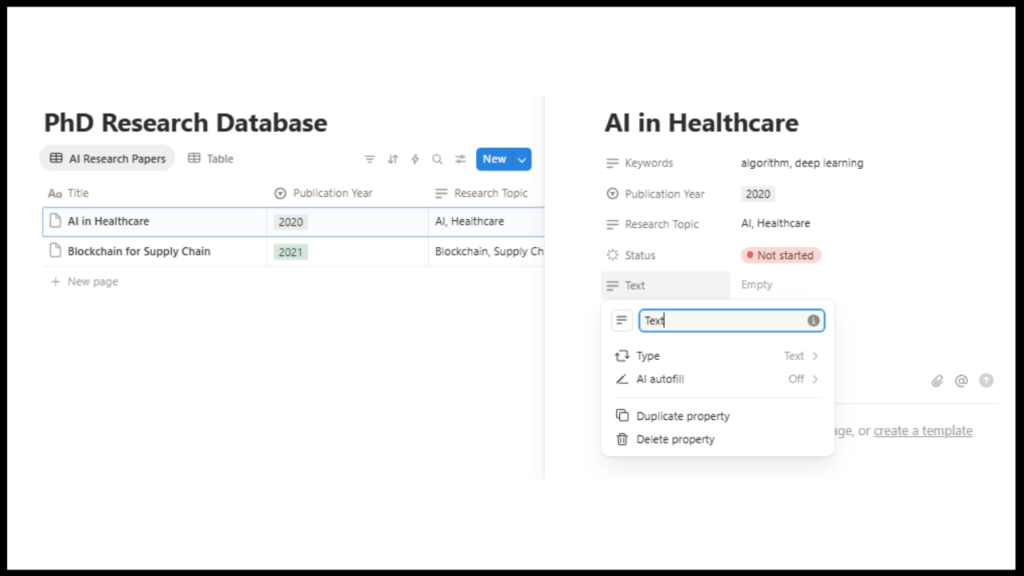
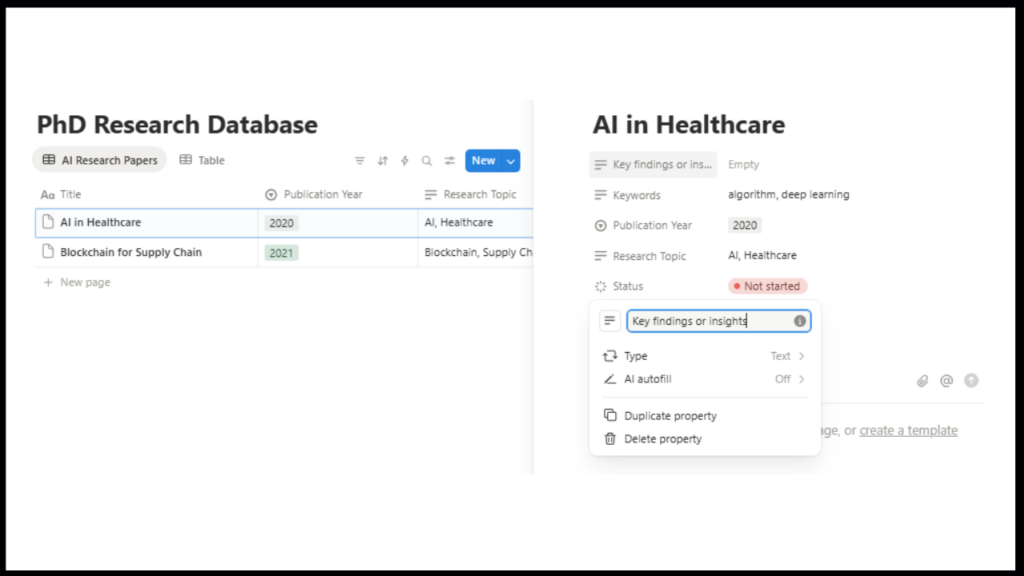
- Add a text block or notes section to record your thoughts on the paper. You can include:
- Key findings or insights.
- Questions you have or critiques of the paper.
- Theories, models, or methodologies discussed.
- Connections to your own research or potential applications.
You can also use a linked database within each paper’s page if you want to track multiple notes, summaries, or related information. For example, if you’re working with a specific theory or concept, you can create another database for your notes on that topic and link it back to your research paper.
Structuring Your PhD Writing in Notion
Writing your PhD thesis requires clear structure and organization. Notion helps you stay organized through:
Set Writing Goals and Deadlines
Setting clear writing goals and deadlines is essential to completing your PhD thesis. Notion makes it easy to create a detailed writing schedule. Here’s how you can do it:
- Create a Writing Timeline: Set up a detailed timeline for your thesis, breaking down each chapter or section. For example, divide your thesis into sections such as:
- Literature Review
- Methodology
- Results and Discussion
- Conclusion
- Set Milestones for Each Section: Use Notion’s task management features to set specific deadlines for each chapter or section. For instance:
- Deadline for completing the Literature Review.
- Deadline for writing the Methodology chapter.
- Use Notion’s Calendar or Task Lists: Add tasks and set deadlines for each writing milestone. Notion allows you to create a calendar view or task list that tracks your writing progress.
- Set Reminders: Set reminders for each task to ensure you stay on schedule and avoid missing deadlines.
By breaking down your writing into smaller tasks with specific deadlines, you can stay on track and manage the entire writing process.
Outline Your Thesis
Outlining your thesis is a critical part of the writing process. Notion’s bullet points and toggle lists allow you to structure your thesis easily. Here’s how to outline your thesis in Notion:
- Create a Thesis Outline: Start by creating a high-level outline of your thesis. Break down your thesis into chapters and subsections. For example:
- Chapter 1: Introduction
- Chapter 2: Literature Review
- Chapter 3: Methodology
- Chapter 4: Results and Discussion
- Chapter 5: Conclusion
- Expand Each Section: Under each chapter, break down the key topics or subtopics you want to discuss. Notion allows you to use bullet points and toggle lists to outline key sections, making it easy to organize and expand your writing.
- Link to Research: As you create your outline, you can link each section to related research papers or notes in your research database. This helps you stay organized and ensures you cover all necessary points in your writing.
Track Writing Progress
Tracking your writing progress in Notion can help keep you motivated and ensure you meet deadlines. Notion’s built-in progress tracking features allow you to visually see how far you’ve come in your writing. Here’s how to track your progress:
- Use Progress Bars: Notion has progress bars that you can add to each chapter or section. As you complete tasks (like writing a section or completing a draft), you can update the progress bar to reflect how much of the chapter has been completed.
- Create Task Lists: Break your writing into smaller, manageable tasks (e.g., writing the introduction, drafting the literature review). As you complete each task, check it off. Notion automatically updates the progress and helps you visualize your completion.
- Review Milestones: Regularly review the milestones and writing goals you’ve set. Update the status of each chapter and section (e.g., “In Progress,” “Completed”). This gives you a clear picture of your overall progress and helps you stay on top of your writing.
By tracking your progress in Notion, you ensure that every chapter or section of your thesis is moving forward and that deadlines are met on time.

Frequently Asked Questions (FAQs)
1. How do I organize my research papers in Notion?
Use Notion’s database feature to categorize research papers by title, topic, and author. You can also tag papers with keywords for easy retrieval.
2. How can I track my writing progress in Notion?
Set clear writing goals and deadlines, and use Notion’s task management system to track your progress and milestones.
3. Can Notion be used for collaboration with my research team?
Yes, Notion supports real-time collaboration, allowing multiple users to work on the same workspace, share notes, and get feedback.
4. Is Notion free to use for PhD students?
Notion offers a free version with most features available. For more advanced features, such as unlimited file uploads, there are paid versions.
Conclusion
Using Notion for PhD Research can greatly improve how you manage literature, research notes, and thesis writing. It brings structure, clarity, and efficiency to the entire PhD journey. With a simple setup and regular use, Notion becomes a powerful academic tool that grows with your research.
For scholars who need expert assistance with literature review, proposal writing, thesis writing, data analysis, or journal publication, kenfra research provides all kinds of PhD support to help researchers achieve academic success.








Leave a Reply