researchgate vs google scholar

ResearchGate vs Google Scholar: Which One Should Researchers Focus On?
In the digital age, researchers have access to powerful tools that make finding, sharing, and tracking academic work easier than ever. Among the most popular platforms are ResearchGate and Google Scholar. Many researchers often compare ResearchGate vs Google Scholar to decide which one is more useful for their work.

This blog will explain both platforms in simple words, compare their features, and help you understand which one you should focus on. We will also briefly touch on how they compare with IEEE and answer common questions researchers have.

What is ResearchGate?

ResearchGate is a social networking platform designed specifically for researchers and scientists. It allows users to share their research papers, ask questions, collaborate with others, and build a professional academic profile.

Key Features of ResearchGate

  • Upload and share research papers
  • Ask and answer academic questions
  • Follow researchers in your field
  • Get statistics on reads, citations, and recommendations
  • Build a research-focused network

It is often compared to LinkedIn, but only for academics. If you are looking for guidance on how to publish your work, collaborate effectively, or maximize your research impact, our PhD assistance services at Kenfra Research provide expert support tailored for scholars in India.

What is Google Scholar?

Google Scholar is a free search engine that indexes scholarly articles, theses, books, conference papers, and patents. It helps researchers find reliable academic content across multiple disciplines.

Key Features of Google Scholar

  • Search millions of research papers instantly
  • Track citations of your work
  • Create a public researcher profile
  • Get alerts for new research in your field
  • Easy access to PDFs and journal links

It is widely used because of its simplicity and powerful search capabilities.

ResearchGate vs Google Scholar: Key Differences

Let’s break down the main differences between these two platforms.

1. Purpose

  • ResearchGate: Designed for networking and collaboration among researchers
  • Google Scholar: Built for searching and discovering academic content

If your goal is to connect and interact with other researchers, ResearchGate is more suitable. For quickly finding academic papers and sources, Google Scholar is the better choice.

2. Ease of Use

Google Scholar is straightforward and user-friendly—you can simply type your query and get instant results.

ResearchGate requires creating an account and engaging with the platform to fully benefit from its features.

Overall, Google Scholar offers a simpler and faster user experience.

3. Research Visibility

Google Scholar automatically indexes publications available online, increasing their reach through search results. This makes it easier for researchers to discover relevant research topics.

ResearchGate allows users to upload their work manually, which can also boost visibility, especially with active participation.

Google Scholar provides broader and more passive visibility, while ResearchGate visibility depends more on user activity.

4. Networking Opportunities

ResearchGate excels in networking features. It allows users to:

  • Follow other researchers
  • Send messages
  • Participate in discussions

Google Scholar does not include social or networking features.

ResearchGate is more effective for building academic connections.

5. Citation Tracking

Both platforms offer citation tracking, but Google Scholar’s metrics are more widely recognized in academia.

ResearchGate provides its own metrics, such as the RG Score, which are less universally accepted.

Google Scholar is generally more reliable for citation analysis.

6. Content Availability

Google Scholar aggregates content from journals, universities, and repositories worldwide, offering extensive coverage.

ResearchGate primarily relies on users uploading their own publications.

Google Scholar typically provides a wider range of accessible academic content.

7. Collaboration

ResearchGate supports collaboration through messaging, Q&A sections, and discussion threads.

Google Scholar does not offer collaboration tools.

ResearchGate is better suited for direct academic collaboration.

Advantages and Disadvantages of ResearchGate

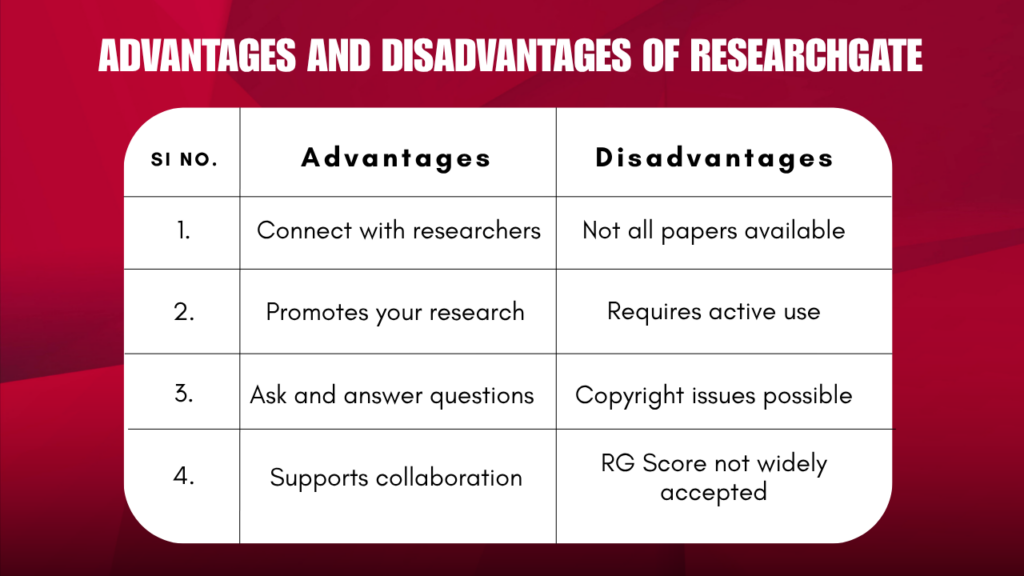
Advantages of ResearchGate

Here are some benefits of using ResearchGate:

1. Academic Networking

You can connect with experts in your field and grow your academic circle.

2. Research Promotion

Uploading your work helps increase visibility and engagement.

3. Q&A Feature

You can ask questions and get answers from real researchers.

4. Collaboration Opportunities

It is easier to find partners for research projects.

Disadvantages of ResearchGate

  • Not all papers are available
  • Requires active participation
  • Some copyright issues when uploading papers
  • RG Score is not widely accepted

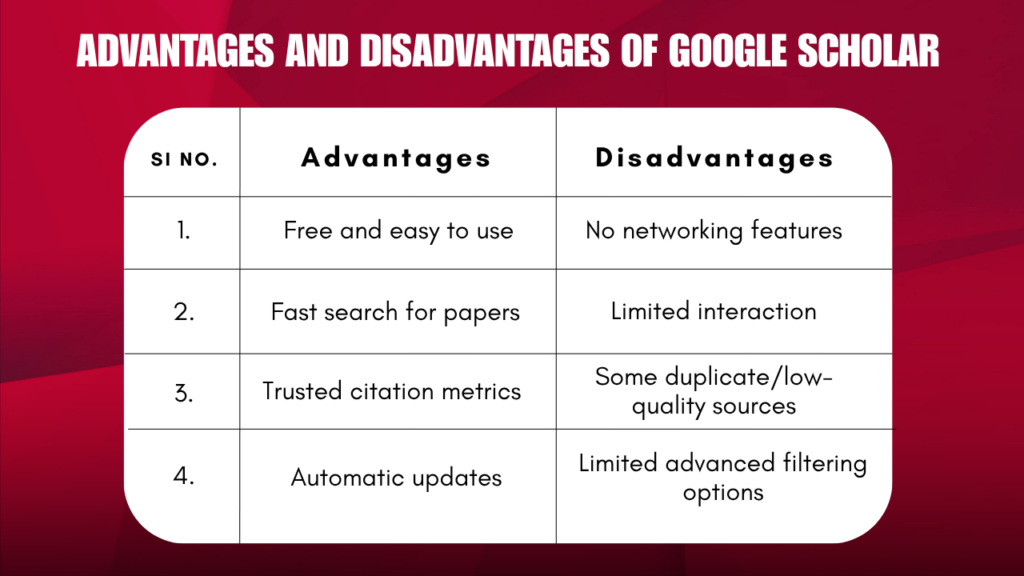
Advantages of Google Scholar

1. Free and Easy to Use

No sign-up is required for searching.

2. Powerful Search Engine

Find relevant research papers quickly.

3. Accurate Citation Metrics

Widely trusted in academia.

4. Automatic Updates

Your profile updates when new citations appear.

Advantages and Disadvantages of Google Scholar

Disadvantages of Google Scholar

  • No networking features
  • Limited interaction with other researchers
  • Sometimes includes duplicate or low-quality sources

Which One Should You Focus On?

The answer depends on your goals as a researcher.

Choose Google Scholar if:

  • You want to find research papers quickly
  • You need accurate citation tracking
  • You want global visibility for your publications

Choose ResearchGate if:

  • You want to connect with other researchers
  • You are looking for collaboration opportunities
  • You want to engage in academic discussions

Best Strategy: Use Both Platforms

Instead of choosing one, the best approach is to use both ResearchGate and Google Scholar together.

Why?

  • Google Scholar increases your discoverability
  • ResearchGate helps you build relationships

Pro Tip:

  • Create a Google Scholar profile and keep it updated
  • Upload your publications on ResearchGate
  • Stay active by answering questions and engaging with others

This combination can boost your academic presence and research impact.

Frequently Asked Questions

1. How to create a Google Scholar account?

  • Sign in with your Google account.
  • Go to Google Scholar.
  • Click on “My Profile” and fill in your name, affiliation, research interests, and email address.
  • Add your publications to complete your profile.

After completing these steps, your profile is live, and your Google Scholar ID is generated automatically.

2. How to get Google Scholar ID?

To get a Google Scholar ID, you first need to create a Google Scholar account. Once your profile is created, Google automatically generates a unique ID for you, which can be used to track your publications and citations.

3. How to find Google Scholar ID?

Your Google Scholar ID is part of your profile URL. To find it:

  1. Sign in to Google Scholar.
  2. Click “My profile” at the top right.
  3. Look at the URL in your browser. It will look like:
    https://scholar.google.com/citations?user=abcdefghijk
  4. The part after user= (here, abcdefghijk) is your Google Scholar ID.

This ID is unique to your profile and can be used for citations, linking, or sharing your publications.

4. What is Google Scholar ID?

A Google Scholar ID is a unique identifier assigned to your Google Scholar profile. It links all your publications, citation metrics, and research impact in one profile. It is used by other researchers to find and cite your work accurately.

ResearchGate and Google Scholar

Final Thoughts

When comparing ResearchGate vs Google Scholar, it is clear that both platforms serve different purposes. Google Scholar is the best tool for searching academic content and tracking citations, while ResearchGate is ideal for networking and collaboration.

By using both strategically, you can maximize your research impact, increase citations, and build a strong academic profile. If you need any PhD support, Kenfra Research, the best PhD assistance in India, can provide expert guidance. Their services in research methodology, publication support, and academic planning complement the advantages of these platforms, helping researchers achieve their goals efficiently.

Share this post

Leave a Reply

Your email address will not be published. Required fields are marked *