

Top Tips to Simplify Your Invoicing Process for Higher Productivity
Kenfra Research - Bavithra2026-03-18T10:53:21+05:30Managing invoices can feel like a small task—until it starts taking up too much of your time. Whether you are a freelancer, small business owner, or part of a growing company, a messy invoicing process can slow you down, delay payments, and create unnecessary stress.
The good news? You can simplify your invoicing process with a few smart changes. In this guide, you’ll learn easy and practical tips to streamline invoicing, save time, and boost your productivity.
Why Simplifying Your Invoicing Matters?
Before diving into the tips, let’s understand why this is important. A complicated invoicing and billing process can lead to:
- Late payments
- Errors in billing
- Poor cash flow
- Wasted time on manual tasks
When you simplify invoicing, you:
- Get paid faster
- Reduce mistakes
- Improve client relationships
- Focus more on growing your business
15 Proven Tips to Simplify Your Invoicing Process and Boost Productivity
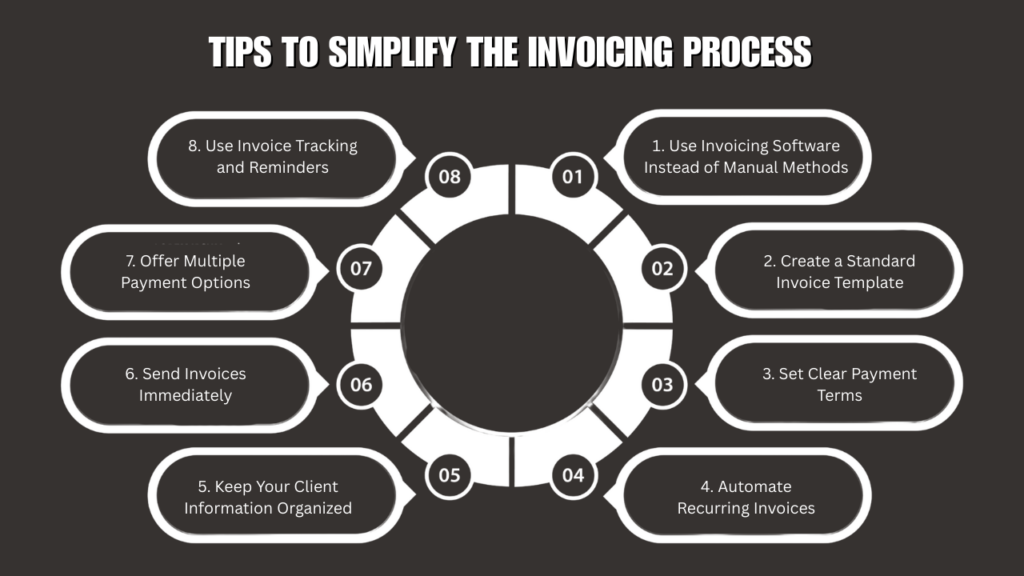
1. Use Invoicing Software Instead of Manual Methods
One of the biggest mistakes businesses make is relying on manual invoicing methods like spreadsheets or handwritten bills. These methods are slow and prone to errors.
Switching to invoicing software can save you hours every week. These tools allow you to:
- Create professional invoices quickly
- Automatically calculate totals and taxes
- Store customer details
- Track payments in real-time
With automation, you reduce mistakes and improve efficiency.
2. Create a Standard Invoice Template
Creating a new invoice from scratch every time wastes valuable time. Instead, design a standard invoice template that includes:
- Your business name and contact details
- Customer information
- Invoice number
- Payment terms
- Itemized list of services or products
Once your template is ready, you can reuse it for every client. This ensures consistency and makes your invoices look more professional.
3. Set Clear Payment Terms
Unclear payment terms can lead to confusion and delays. Always mention your payment terms clearly on every invoice.
Examples include:
- Payment due within 7, 15, or 30 days
- Late payment fees
- Accepted payment methods
When clients know exactly when and how to pay, they are more likely to pay on time.
4. Automate Recurring Invoices
If you work with clients on a regular basis, such as monthly services or subscriptions, automate your recurring invoices.
This helps you:
- Save time on repeated tasks
- Avoid forgetting to send invoices
- Maintain a steady cash flow
Automation ensures that invoices are sent on time without manual effort.
5. Keep Your Client Information Organized
Disorganized client data can slow down your invoicing process. Make sure all your client information is stored in one place.
Include details like:
- Name and company
- Email address
- Billing address
- Payment history
Having everything organized makes it easy to generate invoices quickly and reduces errors.
6. Send Invoices Immediately
Delaying invoices can delay your payments. The sooner you send an invoice, the sooner you get paid.
Make it a habit to:
- Send invoices right after completing a job
- Avoid waiting until the end of the week or month
Quick invoicing keeps your cash flow steady and improves your financial planning.
7. Offer Multiple Payment Options
Clients prefer convenience when making payments. If you offer limited payment methods, it may slow down the process.
Provide multiple options such as:
- Bank transfer
- Credit/debit cards
- Digital wallets
- Online payment links
The easier it is to pay, the faster you will receive your money.
8. Use Invoice Tracking and Reminders
Sometimes clients forget to pay on time. Instead of manually following up, use tools that offer invoice tracking and automatic reminders.
Benefits include:
- Notifications when invoices are viewed
- Alerts for overdue payments
- Automatic reminder emails
This reduces the need for awkward follow-ups and ensures timely payments.
9. Keep Your Invoices Simple and Clear
A complicated invoice can confuse clients and delay payments. Keep your invoices simple and easy to understand.
Use:
- Clear item descriptions
- Proper formatting
- Simple language
Avoid unnecessary details that may overwhelm the client. A clean invoice improves communication and speeds up payments.
10. Regularly Review Your Invoicing Process
Your invoicing process should evolve as your business grows. Take time to review and improve it regularly.
Ask yourself:
- Are invoices being sent on time?
- Are payments delayed often?
- Is there any repetitive task that can be automated?
By identifying weak points, you can make continuous improvements.
11. Maintain Proper Records
Keeping track of all your invoices is important for accounting and tax purposes.
Make sure you:
- Store all invoices securely
- Keep digital backups
- Organize them by date or client
This not only helps during tax filing but also gives you a clear view of your business finances.
12. Train Your Team (If Applicable)
If you have a team handling invoicing, ensure they follow a standard process. Provide proper training so everyone understands:
- How to create invoices
- When to send them
- How to track payments
A well-trained team reduces errors and improves efficiency.
13. Integrate Invoicing With Accounting Tools
Connecting your invoicing system with your accounting tools can save time and reduce manual work.
Integration helps you:
- Automatically record transactions
- Track income and expenses
- Generate financial reports
This gives you better control over your business finances.
14. Use Numbering and Organization Systems
Always assign a unique invoice number to each invoice. This helps you:
- Track invoices easily
- Avoid duplication
- Maintain proper records
A simple numbering system keeps your invoicing organized and professional.
15. Focus on Consistency
Consistency is key to a smooth invoicing process. Set a routine and stick to it.
For example:
- Send invoices on the same day each week
- Review payments every Friday
- Follow up on overdue invoices regularly
A consistent process reduces confusion and keeps everything running smoothly.

Frequently Asked Questions
1. What is the simplest way to handle invoices?
The easiest way to manage invoices is by using invoicing software that automates tasks like creation, tracking, and payment reminders.
2. How can I receive payments from clients more quickly?
To get paid faster, send invoices right away, clearly mention payment terms, and provide multiple easy payment options.
3. How does invoicing affect productivity?
An efficient invoicing system saves time, minimizes errors, and keeps your cash flow consistent, improving overall productivity.
4. Is it a good idea to automate invoicing?
Yes, automating your invoicing process reduces manual effort, improves accuracy, and allows you to focus on growing your business.
Final Thoughts
Simplifying your invoicing process doesn’t require big changes—just smart ones. By using automation, setting clear rules, and staying organized, you can:
- Save time
- Reduce stress
- Get paid faster
- Focus on what truly matters—growing your business
Start with a few of these tips and gradually implement more. Even small improvements can make a big difference in your productivity. And if you’re looking for an easy, free billing app to get started, Kenfra BillPad can help you simplify your invoicing in just a few clicks!










Leave a Reply