researchgate account creation

How to Sign Up on ResearchGate and Build Your Academic Profile
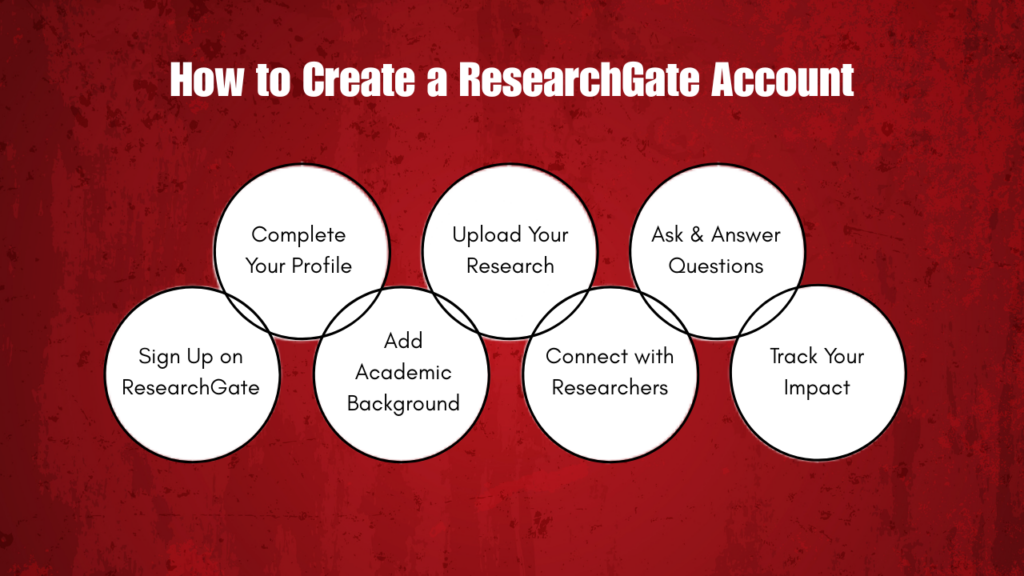

If you are a student, researcher, or academic professional, building a strong online presence is more important than ever. One of the best platforms to achieve this is ResearchGate. It allows you to connect with researchers around the world, share your work, and stay updated with the latest studies in your field. In this guide, you will learn everything about ResearchGate account creation and how to build a strong academic profile step by step. The process is simple and easy to follow, making it perfect for beginners as well as experienced researchers who want to improve their online visibility.

What is ResearchGate?

ResearchGate is a social networking site made especially for scientists, researchers, and students. It allows users to:

Understanding ResearchGate account creation is the first step to joining this platform. Having a well-built profile on ResearchGate can improve your visibility in the academic world and help you connect with the right audience.

Step-by-Step Guide to Signing Up and Building a ResearchGate Profile

How to Create a ResearchGate Account

Step 1: How to Sign Up on ResearchGate

Creating an account is simple and only takes a few minutes.

1. Visit the Website

Go to the official ResearchGate website using your browser.

2. Click on “Join for Free”

You will see a button to create a new account. Click on it.

3. Enter Your Details

Fill in the required information:

  • Full name
  • Email address (preferably academic email)
  • Password

4. Choose Your Role

You will be asked to select your role:

  • Student
  • Researcher
  • Professor
  • Industry professional

Choose the one that matches your current position.

5. Add Institutional Information

Enter your university, college, or organization name. This helps verify your academic identity.

6. Verify Your Email

Check your email inbox and click on the verification link to activate your account.

Step 2: Complete Your Profile

After signing up, your next goal is to build a complete and professional profile.

Add a Profile Photo

Use a clear and professional image. Avoid casual or unclear pictures.

Write Your Headline

Your headline should describe your field and role. Example:

  • “MSc Physics Student | Quantum Research Enthusiast”

Add Your Bio

Write a short introduction about yourself:

Keep it simple and clear.

Step 3: Add Your Academic Background

This section is very important for credibility.

Include:

  • Degrees (BSc, MSc, PhD, etc.)
  • University names
  • Years of study
  • Specializations

This helps others understand your academic journey.

Step 4: Upload Your Research Work

One of the biggest advantages of ResearchGate is sharing your work.

Types of Content You Can Upload:

Tips:

  • Upload only your own work or work you have permission to share
  • Add proper titles and descriptions
  • Use keywords related to your research

Step 5: Add Skills and Research Interests

This helps others find your profile.

Examples:

  • Machine Learning
  • Environmental Science
  • Biotechnology
  • Data Analysis

Choose keywords that match your field.

Step 6: Connect with Other Researchers

Networking is key on ResearchGate.

You can:

This helps you stay updated and build relationships.

Step 7: Ask and Answer Questions

ResearchGate has a Q&A section where you can:

  • Ask academic questions
  • Answer others’ queries
  • Share your knowledge

This increases your visibility and credibility.

Step 8: Track Your Research Impact

ResearchGate provides metrics like:

These show how your work is performing.

Step 9: Keep Your Profile Updated

Always update your profile when:

  • You publish new research
  • You complete a degree
  • You change institutions

A fresh profile attracts more attention.

Tips to Build a Strong Academic Profile

Here are some simple but powerful tips:

  • Be Complete

Fill every section of your profile.

  • Use Clear Language

Avoid complex words. Keep it easy to understand.

  • Stay Active

Log in regularly, interact with others, and share updates.

  • Use Keywords

Add relevant keywords to your profile and uploads to improve visibility.

  • Be Professional

Maintain a formal tone and accurate information.

Common Mistakes to Avoid

  • Using personal or unprofessional photos
  • Leaving profile sections empty
  • Uploading copyrighted content without permission
  • Ignoring messages or connections
  • Not updating your profile regularly

Benefits of Using ResearchGate

  • Increases academic visibility
  • Helps you connect globally
  • Improves research impact
  • Provides learning opportunities
  • Builds your professional identity

Frequently Asked Questions

1. How do I create a ResearchGate account?

To create an account on ResearchGate, follow these steps:

  1. Visit the official ResearchGate website
  2. Click on “Join for Free”
  3. Enter your name, email address, and password
  4. Select your role (student, researcher, professor, etc.)
  5. Add your institution details
  6. Verify your email to activate your account

Once done, you can start building your academic profile.

2. Is the ResearchGate account free?

Yes, ResearchGate is completely free to use. You can create an account, upload research, connect with other researchers, and explore academic content without any charges.

3. Can I create a ResearchGate account without an institutional email?

Yes, you can sign up using a personal email address. However, using an academic or institutional email is recommended because it helps verify your profile and improves credibility within the research community.

4. How can I get a ResearchGate ID?

Your ResearchGate ID is automatically created when you sign up on ResearchGate. After registration, your profile will have a unique URL (profile link), which acts as your ResearchGate ID. You can share this link with others to showcase your academic profile.

researchgate id creation

Conclusion

Creating a ResearchGate account is a smart step for anyone in academics. It not only helps you share your work but also connects you with a global research community. By following the steps in this guide, you will clearly understand how to create ResearchGate account, complete the ResearchGate account creation process, and access your profile through ResearchGate account login.

You can easily sign up on ResearchGate and build a strong academic profile. Keep your profile updated, stay active, and use the right keywords to grow your presence. For additional support, platforms like Kenfra Research and PhD Writing Assistance can help you with research guidance, writing support, and improving your academic work.

Share this post

Leave a Reply

Your email address will not be published. Required fields are marked *