
Say Goodbye to Messy Spreadsheets: Hello Cloud CRM
Kenfra Research - Bavithra2025-12-23T17:20:08+05:30In today’s business world, everyone wants to work faster and more easily. Many companies still use spreadsheets, but they can be confusing and hard to manage. A Cloud CRM (Customer Relationship Management) system is a better option. It helps businesses store all customer details in one place, manage sales clearly, and work better as a team.
If you are tired of messy spreadsheets and repeated work, switching to a Cloud CRM can help. This blog explains how a Cloud CRM makes daily work simple by organizing customer data, tracking sales, and improving teamwork.
Why Choose a Cloud CRM System?
1. Eliminate the Mess of Spreadsheets
Spreadsheets can be a nightmare. While they are helpful for storing data, they are often difficult to manage, especially as your business grows. From multiple versions of files to the risk of data loss, spreadsheets are not the ideal tool for managing customer relationships.
A Cloud CRM allows you to store all your customer data securely in one centralized system, accessible from any device with an internet connection. This eliminates the need to juggle multiple spreadsheets, reducing the chances of errors and making it easier for your team to find and update information in real time.
2. Access Your Data Anytime, Anywhere
Unlike traditional spreadsheets, a Cloud CRM gives you the flexibility to access your data wherever you are. Whether you’re working from home, traveling, or at the office, a Cloud-based CRM software ensures that you always have up-to-date customer information at your fingertips. This is particularly valuable for sales teams who need quick access to customer data while on the go.
With a Cloud CRM, your team can collaborate efficiently, even if they’re working remotely or in different locations. No more sending emails with attachments or worrying about whether your team has the latest version of a spreadsheet.
3. Streamline Sales and Customer Management
A Cloud CRM system doesn’t just store data; it helps you manage relationships. You can track customer interactions, schedule follow-up tasks, and automate communication. By having all your customer information organized and easily accessible, your sales team can focus on building relationships and closing deals, instead of manually sorting through spreadsheets.
Many Cloud CRMs also come with built-in sales automation tools, such as lead scoring, pipeline tracking, and automated reminders. These tools help prioritize leads, manage opportunities, and ensure that no customer interaction falls through the cracks.
Key Features of a Cloud CRM System
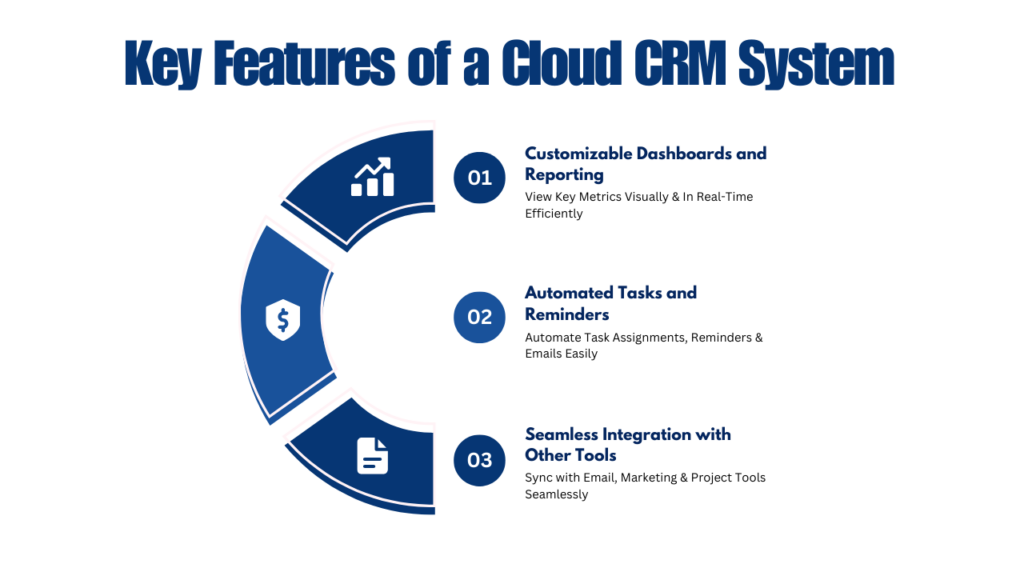
1. Customizable Dashboards and Reporting
One of the standout features of a Cloud CRM is the ability to create customized dashboards and reports. Instead of digging through endless spreadsheets to find key metrics, you can easily view your business’s performance through visual reports and interactive dashboards.
This level of customization ensures that you can focus on the data that matters most to your business, from sales performance to customer retention rates. Plus, since the CRM is cloud-based, reports are always up-to-date and accessible in real time.
2. Automated Tasks and Reminders
Automation is another major benefit of Cloud CRM systems. They can automatically assign tasks to team members, send reminders for follow-ups, and even trigger email campaigns based on customer actions. This level of automation reduces the chances of human error and ensures that no lead or opportunity is missed.
For example, if a potential customer fills out a contact form on your website, your CRM can automatically create a new lead, assign it to a sales rep, and set up a follow-up task—all without any manual effort.
3. Seamless Integration with Other Tools
Cloud CRM systems often integrate with a wide range of other software tools, including email platforms, marketing automation tools, and project management software. This means that your CRM can work alongside the tools you already use, making it easier to share data across departments and keep everything in sync.
For instance, if you use an email marketing tool, your Cloud CRM can automatically sync with it to track email interactions with customers and add new contacts to your email lists. This seamless integration saves time and ensures that all your data is consistent across systems.
FAQs About Cloud CRM
Q1: What is a Cloud CRM system?
A Cloud CRM system is a customer relationship management tool that stores your business’s customer data in the cloud.
Q2: How does a Cloud CRM help improve sales?
A Cloud CRM improves sales by providing your team with real-time access to customer data, automating tasks, and helping track sales opportunities.
Q3: Is a Cloud CRM secure?
Yes, Cloud CRM systems are highly secure, with features like data encryption, multi-factor authentication, and regular backups to protect your customer data.
Q4: How do I transition from spreadsheets to a Cloud CRM?
Transitioning from spreadsheets to a Cloud CRM is straightforward, and most CRM providers offer data migration services.
Q5: Can a Cloud CRM be customized?
Yes, most Cloud CRM systems are highly customizable. You can tailor dashboards, reports, and workflows to match your business processes.

Conclusion: Upgrade Your Business with a Cloud CRM
If you’re still managing customer relationships with messy spreadsheets, it’s time to consider a change. A Cloud CRM system offers a wide range of benefits, from eliminating data errors to improving collaboration and sales performance. By switching to a Cloud CRM, you can streamline your business operations and focus on what matters most—building strong customer relationships.
Also, explore the Kenfra CRM Portal, where we provide CRM with a free trial. Experience firsthand how our CRM solutions can streamline your operations. We are proud to offer the best CRM portal in Marthandam, ensuring top-notch features and seamless integration for all your customer management needs.









Leave a Reply