

Top Features to Look for in a Cloud-Based CRM
Kenfra Research - Bavithra2026-02-17T17:25:40+05:30Running a business means talking to customers, tracking sales, and managing a lot of information every day. A cloud-based CRM features helps you keep everything in one place so nothing gets lost. But not all systems are the same. Before choosing one, you should know which features are important. Below are the top 10 features you should look for in a cloud-based CRM.
Top 10 Cloud-Based CRM Features to Look for in a CRM System
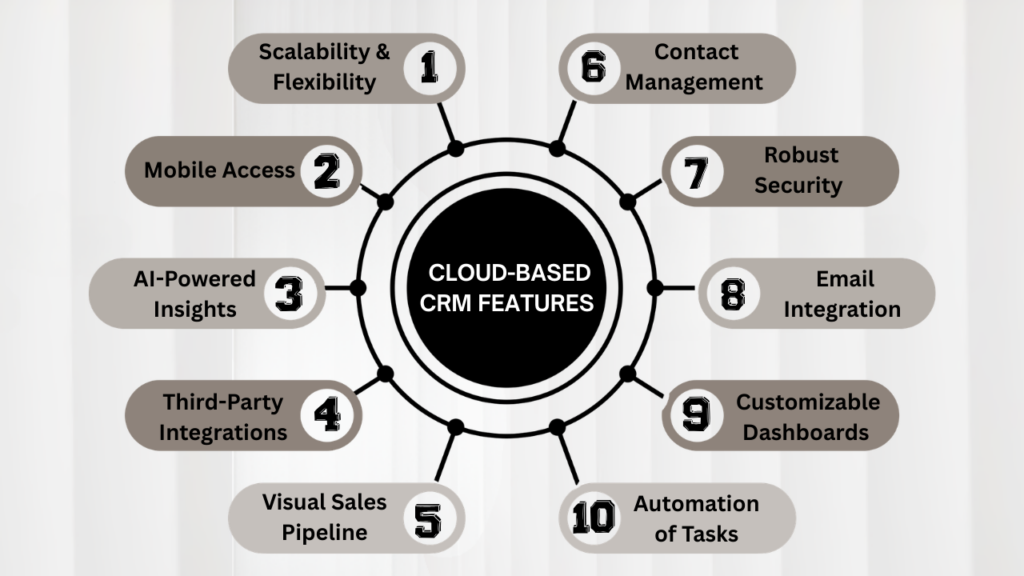
1. Scalability & Flexibility
Your business will not stay the same forever — and your Customer Relationship Management (CRM) system should be ready for growth. Scalability ensures that your system can handle increasing customer data, more users, and expanding operations without slowing down. Whether you are a startup or a growing enterprise, your CRM must adapt to your changing needs.
Flexibility allows you to customize fields, workflows, dashboards, and processes according to your industry and business model. Instead of adjusting your operations to fit the software, the software should adjust to fit you. Key benefits include:
- Easy plan upgrades
- Custom workflows
- Adaptable data fields
- Support for growing teams
A scalable and flexible CRM supports your business today and in the future.
2. Mobile Access
Modern teams work from everywhere — office, home, or on the road. A cloud-based CRM with strong mobile access allows your team to check customer information, update deals, respond to leads, and manage tasks from any device. This keeps productivity high and ensures no opportunity is missed. Important mobile features to look for:
- Real-time syncing
- User-friendly interface
- Offline access
- Instant notifications
With mobile access, your sales and support teams stay connected and efficient at all times.
3. AI-Powered Insights
Artificial intelligence is transforming how businesses manage customer relationships. AI-powered insights analyze sales data, customer behavior, and communication patterns to provide smart recommendations. This helps teams make informed decisions and focus on high-potential opportunities. Features may include:
- Predictive sales forecasting
- Lead scoring
- Customer behavior analysis
- Trend identification
- Smart reminders
With AI-driven tools, your CRM becomes a powerful growth engine rather than just a data storage system.
4. Third-Party App Integrations
Your CRM should work smoothly with the other tools your business uses daily. From email platforms to accounting software and marketing tools, integration ensures data flows seamlessly between systems. This reduces manual data entry and minimizes errors. Strong integration capabilities provide:
- Improved workflow efficiency
- Better team collaboration
- Automatic data updates
- Time savings
A well-integrated CRM creates a connected ecosystem for your business operations.
5. Visual Sales Pipeline
A visual sales pipeline gives a clear picture of where every deal stands. Instead of reviewing complicated spreadsheets, your sales team can track opportunities through stages like new lead, contact made, proposal sent, and closed deal. This visual overview improves focus and planning. Benefits of a visual sales pipeline:
- Clear deal tracking
- Better forecasting
- Faster follow-ups
- Improved accountability
When sales stages are easy to see, it becomes easier to close deals efficiently.
6. Contact Management & Unified View
Effective customer management starts with organized data. A strong cloud CRM software should provide complete contact management, storing all relevant customer information in one place. This includes communication history, purchase records, notes, and interactions. A unified customer view allows your team to:
- Understand the full customer journey
- Deliver personalized communication
- Improve customer satisfaction
- Reduce duplicate records
When everyone has access to accurate, updated information, collaboration improves across departments.
7. Robust Security & Data Protection
Customer data security is critical in today’s digital world. A reliable cloud-based CRM must provide strong data protection measures to prevent unauthorized access and breaches. Protecting sensitive customer information builds trust and ensures compliance with global data regulations. Look for features such as:
- Data encryption
- Secure login methods
- Role-based permissions
- Regular backups
- Compliance certifications
Strong security ensures your business data remains safe and protected at all times.
8. Email Integration & Tracking
Email communication plays a major role in sales and customer engagement. A CRM with built-in email integration allows users to send, receive, and track emails directly within the system. This keeps all communication history organized and accessible. Important email features include:
- Automatic email syncing
- Open and click tracking
- Email templates
- Scheduled follow-ups
- Activity tracking
Email tracking helps your team understand customer engagement and respond at the right time.
9. Customizable Dashboards & Reporting
Data-driven decisions lead to better business outcomes. Customizable dashboards allow managers to monitor performance metrics in real time. Visual reports and charts make it easier to analyze sales performance, team productivity, and customer trends. Key reporting capabilities include:
- Real-time analytics
- Drag-and-drop customization
- Detailed performance reports
- Exportable data
- Goal tracking
With powerful reporting tools, businesses can identify strengths, fix weaknesses, and plan for growth effectively.
10. Automation of Repetitive Tasks
Automation is one of the biggest advantages of a cloud-based CRM. By automating repetitive tasks, businesses save time and reduce manual errors. Automation ensures consistency in communication and improves operational efficiency. Common automation features include:
- Automatic lead assignment
- Scheduled follow-up reminders
- Workflow triggers
- Deal stage updates
- Task notifications
When repetitive work is automated, your team can focus on building relationships and closing more deals.
Frequently Asked Questions:
1. What is a cloud-based CRM and why is it important for businesses?
A cloud-based CRM is a software system that stores and manages customer information online. It helps businesses track sales, manage leads, improve communication, and organize customer data in one place, making operations more efficient and scalable.
2. What features should I look for in a cloud-based CRM?
Key features to look for include scalability and flexibility, mobile access, AI-powered insights, third-party app integrations, visual sales pipelines, contact management, robust security, email integration, customizable dashboards, and automation of repetitive tasks.
3. How does mobile access improve CRM usability?
Mobile access allows sales and support teams to access customer information, update deals, and respond to leads from any device. This ensures that no opportunity is missed and teams can work efficiently from anywhere.
4. Why is automation in CRM important for businesses?
Automation reduces manual tasks like follow-ups, lead assignments, and deal updates. It saves time, improves accuracy, and allows your team to focus on building relationships and closing sales.
5. How do AI-powered insights benefit CRM users?
AI analyzes customer behavior, sales patterns, and communication history to provide predictions and recommendations. This helps teams prioritize high-potential leads, forecast sales, and make smarter decisions.

Conclusion
Choosing the right cloud-based CRM is an important step toward improving customer management, sales performance, and overall business growth. The ideal system should offer the top Cloud-Based CRM Features such as scalability, flexibility, mobile access, intelligent insights, seamless integration, visual sales tracking, organized contact management, strong security, email integration, powerful reporting, and automation. For businesses in India, Kenfra CRM, the best CRM in India, provides these essential Cloud-Based CRM Features, making it easier to manage customers, track sales, and improve team productivity.









Leave a Reply