
5 Hidden CRM Features That Will Take Your Business to the Next Level
Kenfra Research - Bavithra2025-12-05T15:55:05+05:30Customer Relationship Management (CRM) systems are tools that help businesses manage their customers easily and keep everything organized. While most CRM solutions offer common features like contact management, email integration, and lead tracking, there are several hidden CRM features that can truly elevate your business operations. In this post, we’ll explore five of these lesser-known features and how they can help streamline your business processes, improve customer relationships, and ultimately take your business to the next level.
Maximize Your Business with These 5 Hidden CRM Features
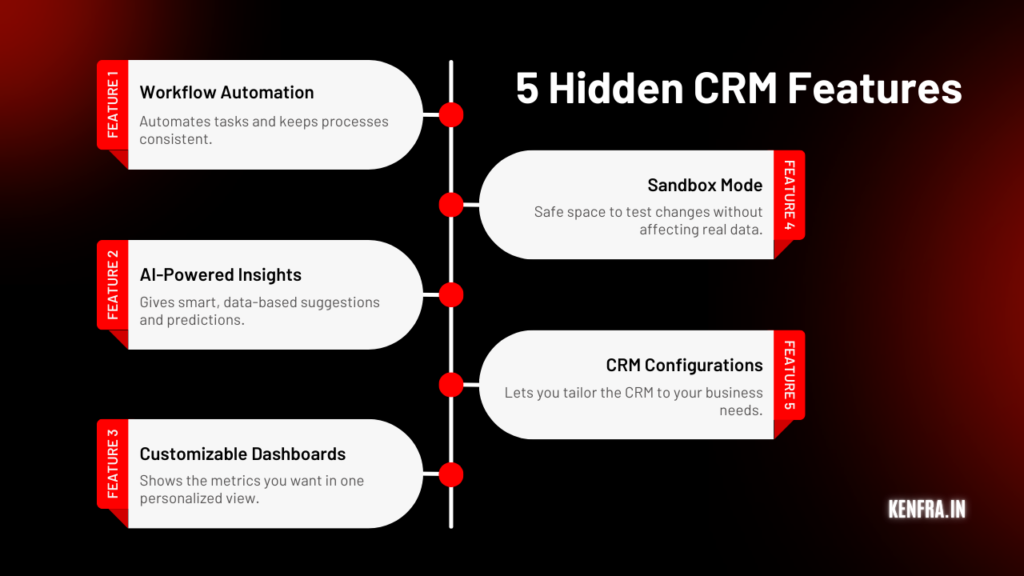
1. Workflow Automation (Blueprints)
One of the most valuable hidden CRM features is workflow automation, often called Blueprints. This feature helps you define and automate the exact steps your team should follow in a process for example, handling a new lead, closing a deal, or managing a customer complaint.
With Blueprint-based workflow automation, you can:
- Set clear rules for each step
- Assign tasks to the right team members
- Send automated notifications or reminders
- Prevent missed steps or errors
- Make every process repeatable and consistent
Think of workflow automation as a digital checklist your CRM follows for you. Instead of your team remembering every small task, the CRM takes care of it. This leads to faster responses, fewer mistakes, and a smoother customer experience.
Why It Matters?
- Saves time by reducing manual tasks
- Ensures consistent processes across the team
- Helps you monitor progress in real-time
- Boosts productivity without extra effort
If you want more structure and efficiency in your business operations, this is one of the CRM tools you should start using immediately.
2. AI-Powered Insights
AI is becoming a must-have in business tools, and CRM software is no different. Many people don’t realize how powerful AI-powered insights inside a CRM can be. This hidden feature analyzes your data and gives smart suggestions that help you make better decisions.
AI-powered CRM insights can:
- Identify which leads will convert easily
- Show which customers might churn
- Suggest the best time to contact someone
- Recommend actions to improve sales performance
- Analyze customer behavior and buying patterns
Instead of guessing what to do next, AI provides data-backed guidance. This allows your sales and marketing teams to work smarter, not harder.
Why It Matters?
- Helps you understand customers more clearly
- Improves lead quality and conversion rates
- Reduces guesswork in decision-making
- Makes your CRM software more powerful and proactive
AI-powered insights are one of the CRM benefits that can truly transform how you grow your business.
3. Customizable Dashboards
Most CRMs come with dashboards, but not everyone knows they can be fully customized. A customizable dashboard is another useful yet often overlooked hidden CRM feature. It lets you choose what information you want to see the moment you open your CRM.
You can personalize dashboards for:
- Sales numbers
- Marketing performance
- Team activities
- Customer engagement
- Revenue trends
- Support tickets
A customized dashboard helps different teams focus on the metrics that matter most to them. Instead of searching through menus and reports, all key data appears in one clean, easy-to-read screen.
Why It Matters?
- Saves time with quick access to important data
- Helps teams stay aligned on goals
- Improves decision-making with real-time insights
- Makes your CRM tools feel more organized and user-friendly
Whether you’re a manager needing an overview or a salesperson tracking daily targets, customizable dashboards help you stay on top of everything.
4. Sandbox Mode
One of the most important yet least talked-about hidden CRM features is Sandbox Mode. This feature allows you to create a safe environment where you can test changes without affecting your live CRM data.
In Sandbox Mode, you can experiment with:
- New workflows
- New configurations
- Automation rules
- Integrations
- Data imports
- Custom fields or modules
It’s basically a copy of your CRM, but any mistakes you make won’t affect real customers or your live system.
Why It Matters?
- Lets you test ideas safely
- Prevents accidental data loss
- Helps you train your team without risk
- Allows smooth rollouts of new CRM features
For growing companies or teams making a lot of updates, Sandbox Mode makes CRM management much safer and more predictable.
5. CRM Configurations
CRM configurations are powerful tools that allow you to tailor the CRM exactly to your business needs. Many users don’t explore this area deeply, which is why it’s considered one of the most hidden CRM features.
With advanced CRM configurations, you can customize:
- Fields and modules
- User roles and permissions
- Data views
- Email templates
- Workflows
- Approval processes
- Notification settings
This ensures your CRM software works the way your business works, not the other way around. Every team sales, marketing, support, operations can have a CRM layout and workflow that fits their daily activities.
Why It Matters?
- Makes the CRM easier and faster for teams to use
- Allows full personalization of business processes
- Improves data accuracy and accessibility
- Enhances overall CRM performance
The more you customize and configure your CRM, the more value it will bring to your business.

Frequently Asked Questions
1. What are the benefits of using advanced reporting in CRM?
Advanced reporting in CRM allows businesses to gain actionable insights from customer data. This helps identify sales trends, forecast revenue, and understand customer behavior more deeply, resulting in better decision-making.
2. How can automation improve CRM efficiency?
Automation within a CRM system helps businesses save time by streamlining repetitive tasks like follow-up emails, lead tracking, and task assignments. This allows your team to focus on higher-value tasks, such as nurturing relationships and closing deals.
3. What is AI-powered lead scoring?
AI-powered lead scoring uses artificial intelligence to evaluate the likelihood that a lead will convert into a paying customer. It analyzes various factors, such as engagement history, and assigns scores to prioritize sales efforts on the most promising leads.
4. Can I customize the CRM dashboard?
Yes, many CRMs offer customizable dashboards, allowing you to display the metrics and KPIs most important to your business. Custom dashboards help your team stay focused and work more efficiently.
Conclusion
If you’re looking to enhance your CRM capabilities, these hidden features can make a huge difference in how you interact with your customers and how you manage your business. By implementing features like automated workflows, AI-powered lead scoring, and integrated customer support, you’ll be able to streamline your operations and improve your overall business efficiency.
At Kenfra CRM Portal, we understand how vital CRM solutions are for businesses. That’s why we offer a CRM with a free trial so you can experience these powerful features for yourself. Get started today and take your business to the next level with Kenfra CRM Portal!







Leave a Reply